
Set/Update Payment Status B2B
Obligation for the Supplier / Sender in France B2B - Money Collection
Background Information
General principle : When you are a sender of sales invoices, you have to update the payment status of your sales invoices (cash collected), this is a reporting from Billit to the PPF for B2B invoices via Flow 1/6.
Details :
- Payment status is only updated when you have received the payment from the customer.
- Goal is to update frequently, it starts from a trigger in your-system that the money is collected.
- This applies to full payment of the invoice, or partial payment (with multiple payments). In case of payment in 2 or more steps, you report each payment and not just one global reporting in the end.
- If payment is done later (no prepayment), it does include the payment date (as stored by the seller).
Do I have to E-report Payments when B2B France (Flow 1/6) ?
In case of goods:
- For goods, VAT is generally due on invoice issuance or delivery ("TVA sur les débits"), not on payment.
- So in most cases sending a payment message is not required.
In case of services:
- In many cases VAT is due on collection ("TVA sur les encaissements"), payment data must be transmitted
In case of mixed:
- If the mixed invoice contains a service component that remains subject to VAT on payment, payment reporting is required for that service part.
- If, under the applicable VAT rules, all VAT has already become chargeable at invoice time, then no separate payment report is needed.
Below overview in a table:
| Type | Report payment ? | VAT is due on | French Clause |
|---|---|---|---|
| Goods | no | invoice issuance or delivery | TVA sur les débits |
| Services | yes | on payment/collection | TVA sur les encaissements |
| Mixed | yes, report the service part | services on payment/ collection | mixed |
If you need to validate your scenario's in more detail, check with your tax consultant.
Prepayment via BusinessProcessType
When posting an a prepaid B2B invoice to Billit, you can include BusinesProcessType B2, S2 or M2, this is enough to e-report prepayment. Then there is no needed to report it separately.
Below distinction between B1/S1/M1 and B2/S2/M2:
| Business Process Type | Description (E) |
|---|---|
| B1 | Goods invoice (French : ‘bien’) - not prepaid |
| S1 | Service invoice - not prepaid |
| M1 | Mixed invoice (delivery of goods and services) - not prepaid |
| B2 | Goods invoice already paid |
| S2 | Service invoice already paid |
| M2 | Mixed invoice already paid |
Remarks:
- When you set B2/S2/M2 (prepaid), then the "Paid" field is not automatilly set. You can adjust the Paid field via API or user interface.
- When you set the BusinessProcessType so S1/B1/M1, and during the same invoice posting you set the payment status to paid, there will be no payment reporting. Payment reporting is only when you update the status later, or when adding a payment, details see next point.
How to update payments
When you need to update payments in B2B France, several methods are available.
General information page (all countries) https://docs.billit.be/docs/set-billit-payment-status-after-sending.
For Flow 10, see the separate information.
CreditNotes Scenario's
Some specific scenario's:
- A credit note has been raised, amount to be paid for the linked invoice is reduced : report only the net amount that has been paid for that invoice, no payment e-reporting for the creditnote.
- A credit note has been raised, linked invoice was already paid, amount paid for another invoice has been reduced : report the net payment amount of the other invoice.
- A credit note has been raised for the full amount of the invoice, the invoice will not be paid as it is cleared by a credit note. As no payment transactions will be issued, no payment must be reported in the PA-network.
- An Invoice was paid (payment has been reported), as a second step the credit note is raised, the amount of the credit note is refunded linked to this credit note by the seller to the customer.
- A payment report with a negative amount is then a possible option.
- Constraint : currently not available at Billit.
Report B2B Payments via the Payments Endpoint
One or more payments can be added to Billit once that the document is created in billit.
| Endpoint | Method | Response |
|---|---|---|
| /v1/order/{orderID}/payments | POST | 200 OK |
Content in the message body:
| Information Element | Mandatory/Optional | Extra Info |
|---|---|---|
| Amount | Mandatory | Amount must be positive |
| Description | Optional | Free text. This text is not included in the PPF communication. |
| Date | Optional | If not filled in, Billit will add the date of Posting of the Payment. |
Example Json body when posting a payment:
POST https://api.sandbox.billit.be/v1/orders/2683999/payments
{
  "Amount": 0.40,
  "Description": "free text",
  "Date": "2026-07-14"
}
The result of the payment updates can also be viewed in the MyBillit user interface and the result can be gathered via API (more info : https://docs.billit.be/docs/communication-from-receiver-to-sender-pa)
What to do when amount of a Invoice has been refunded ?
When a payment has been refunded from seller to customer, then this will be reported too.
How this can be triggered ?
-
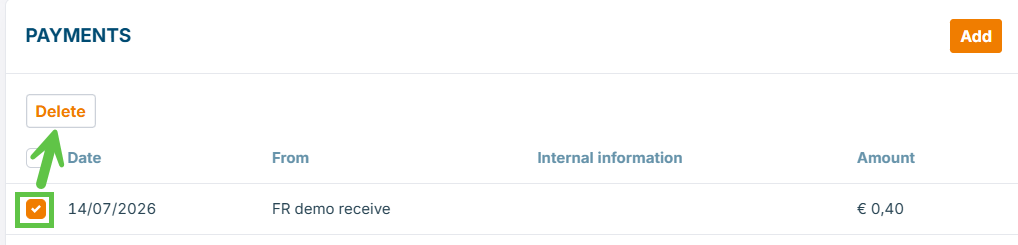
Via the MyBillit user interface : delete a payment:
-
Via the API : currently not possible, updates will be published when available.
Limitations, currently not supported for this API endpoint
Following elements are not supported:
- GET /v1/order/{orderID}/payments.
- Patch /v1/order/{orderID}/payments.
- GET v1/order/{orderID} does not contain the payment information.
How payment status reporting is displayed in Billit UI and reported to PPF
When you report a payment, this is the result:
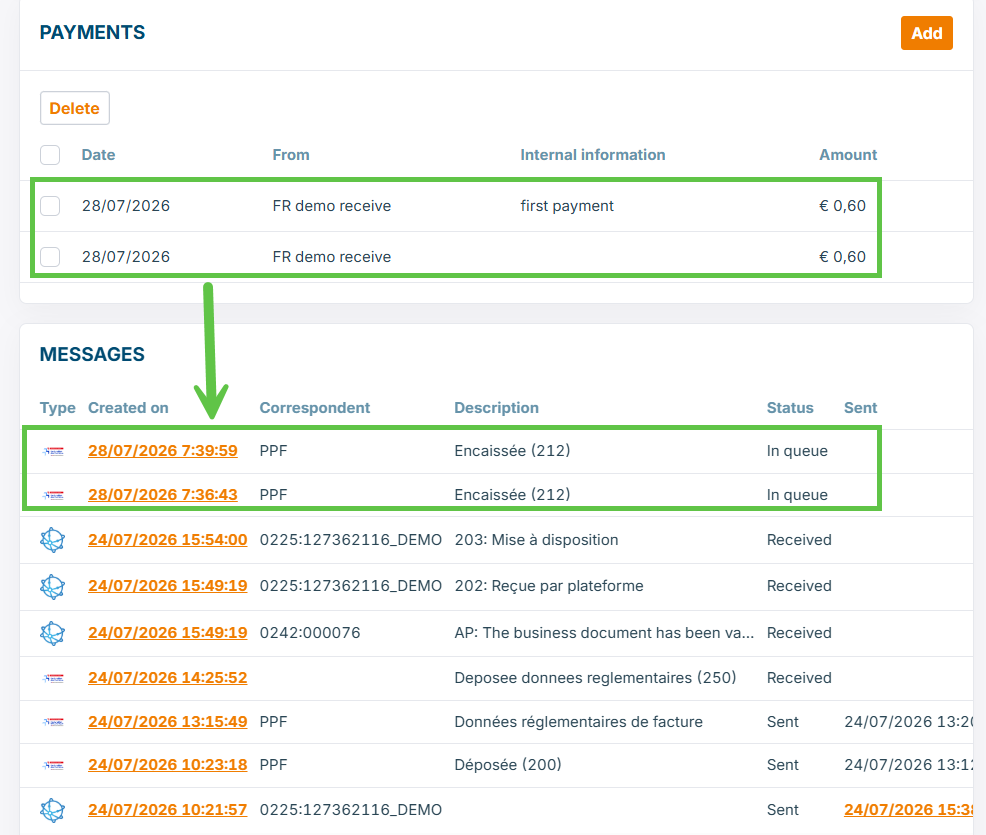
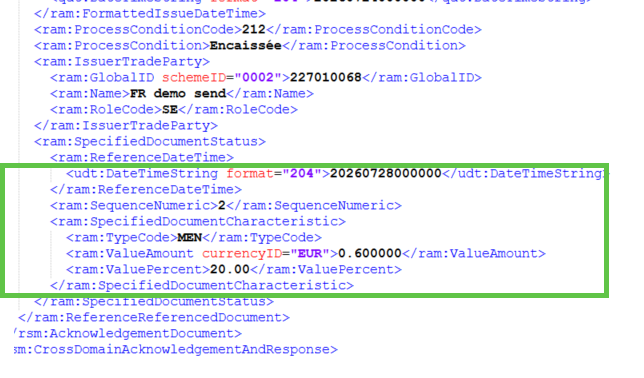
Each payment report of an invoice to the PPF (French Tax Authority) has a sequence, a timestamp and an amount:
Updated 21 days ago