
Self-Billing Receiver Registered on Peppol
When Receiver is Receiving via Billit
In Settings, General, Additional : activate the self-billing Icon. This is mandatory : self-bill receiving cannot happen is there is not registration for the self-bill document type.
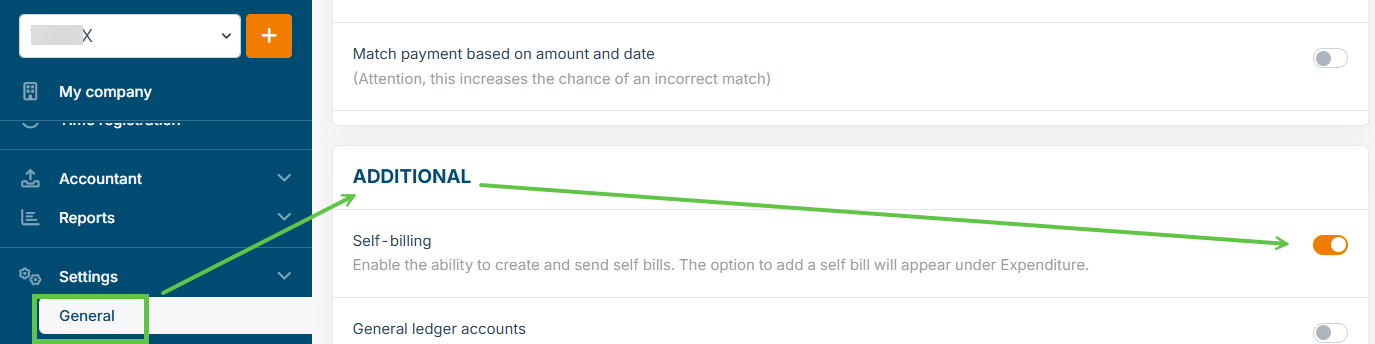
This will allow:
- display the self-billing info on the user interface
- trigger the automatic Peppol registration for the receiving of the Self-billing interface
So when checking the Peppol registration with GET Participant Information, you should see the mentioning of Self-Bill invoice and CreditNote :
{
    "Registered": true,
    "Identifier": "9925:BE0871169999",
    "DocumentTypes": [
        "BISv3InvoiceSelfBilling",
        "BISv3CreditNoteSelfBilling",
        "IMR",
        "MLR",
        "BISv3CreditNote",
        "BISv3Invoice"
    ],
When Receiver is Receiving via Another Access Point
If the receiving of Peppol documents via another Access Point then Billit:
- Make sure the document types Self-Bill Invoice and Self-bill Credit Note get registered via this Access Point.
- Check this before starting the Self-Bill sending.
- If the receiver is not registered for self-billing, contact the receiver and request the self-bill activation.
Updated 8 months ago
Did this page help you?