
How to E-report payments
Flow 10 E-reporting
Background Information
General principle : When you are a sender of sales invoices, you have to update the payment status of your sales invoices (cash collected), this is a reporting from Billit to the PPF for B2B invoices via Flow 1/6.
Details :
- Payment status is only updated when you have received the payment from the customer.
- Goal is to update frequently, it starts from a trigger in your-system that the money is collected.
- This applies to full payment of the invoice, or partial payment (with multiple payments). In case of payment in 2 or more steps, you report each payment and not just one global reporting in the end.
- If payment is done later (no prepayment), it does include the payment date (as stored by the seller).
CreditNotes Scenario's
Some specific scenario's:
- A credit note has been raised, amount to be paid for the linked invoice is reduced : report only the net amount that has been paid for that invoice, no payment e-reporting for the creditnote.
- A credit note has been raised, linked invoice was already paid, amount paid for another invoice has been reduced : report the net payment amount of the other invoice.
- A credit note has been raised for the full amount of the invoice, the invoice will not be paid as it is cleared by a credit note. As no payment transactions will be issued, no payment must be reported in the PA-network.
- An Invoice was paid (payment has been reported), as a second step the credit note is raised, the amount of the credit note is refunded linked to this credit note by the seller to the customer.
- A payment report with a negative amount is then a possible option.
- Constraint : currently not available at Billit.
Report B2B Payments via the Payments Endpoint
One or more payments can be added to Billit once that the document is created in billit.
| Endpoint | Method | Response |
|---|---|---|
| /v1/order/{orderID}/payments | POST | 200 OK |
Content in the message body:
| Information Element | Mandatory/Optional | Extra Info |
|---|---|---|
| Amount | Mandatory | Amount must be positive |
| Description | Optional | Free text. This text is not included in the PPF communication. |
| Date | Optional | If not filled in, Billit will add the date of Posting of the Payment. |
Example Json body when posting a payment:
POST https://api.sandbox.billit.be/v1/orders/2683999/payments
{
  "Amount": 0.40,
  "Description": "free text",
  "Date": "2026-07-14"
}
The result of the payment updates can also be viewed in the MyBillit user interface and the result can be gathered via API (more info : https://docs.billit.be/docs/communication-from-receiver-to-sender-pa)
Alternative : Set payment status to paid in Billit
The payment status of outgoing sales invoices can be set in Billit.
This is interesting when:
- You use Billit for follow-up of your invoices. Payment status is then displayed in MyBillit, giving users additional information.
- In certain countries sending payment information is mandatory (e.g. France)
The payment status can be patched :
| Endpoint | Method | Response |
|---|---|---|
| /v1/order/{orderID} | PATCH | 200 OK |
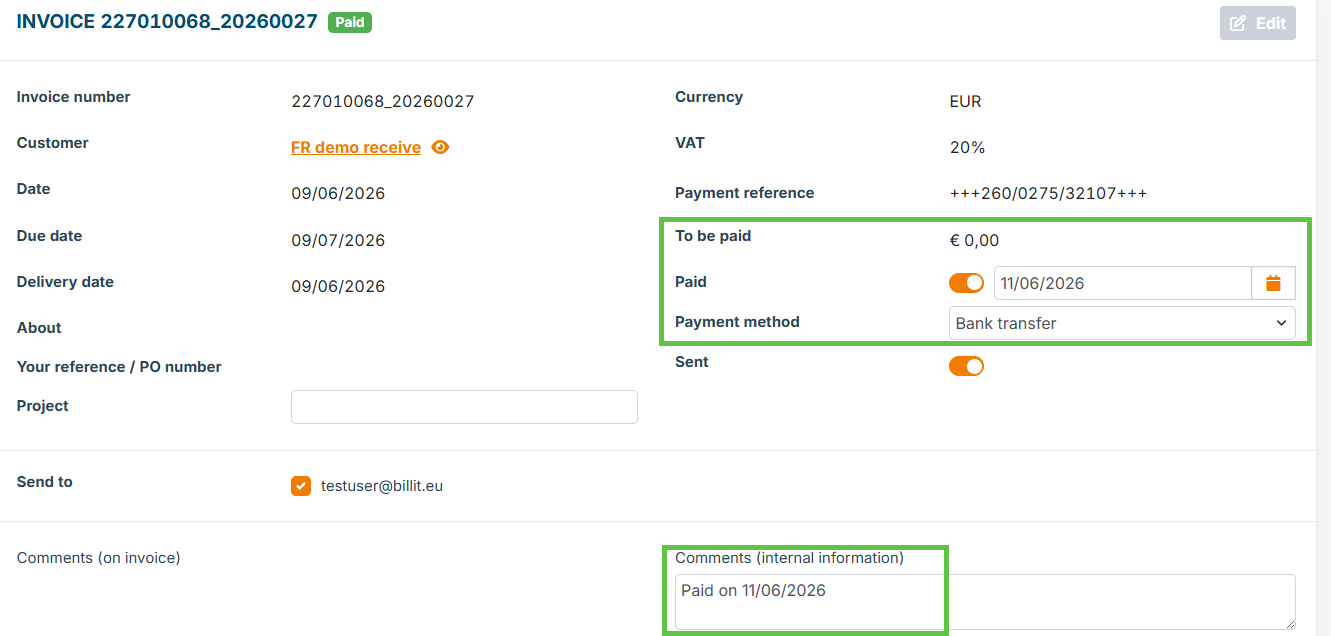
Example of a Patch to set the Invoice to 100 % paid:
{
  "Paid": true,  //Alternative false
  "PaidDate": "2026-06-11T00:00:00",  //Must Include Date and Time
  "PaymentMethod" : "Wired", //Must be an allowed value
  "InternalInfo": "Paid on 11/06/2026",  // for additional information
}
Result of the Patch in the User Interface:
What to do when amount of a Invoice has been refunded ?
When a payment has been refunded from seller to customer, then this will be reported too.
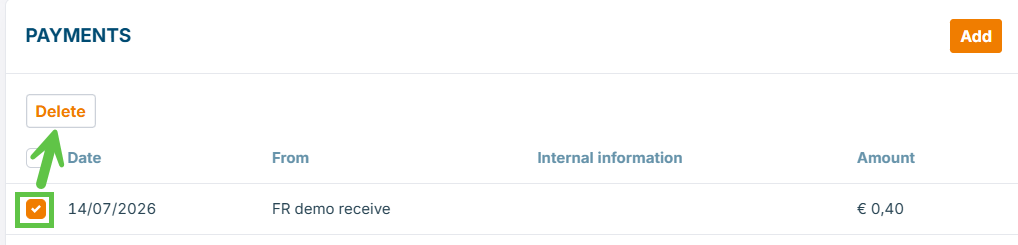
How this can be triggered ?
-
Via the MyBillit user interface : delete a payment:
-
Via the API : currently not possible, updates will be published when available.
Limitations, currently not supported for this API endpoint
Following elements are not supported:
- GET /v1/order/{orderID}/payments.
- Patch /v1/order/{orderID}/payments.
- GET v1/order/{orderID} does not contain the payment information.
How payment status reporting is displayed in Billit UI and reported to PPF
When you report a payment, this is the result:
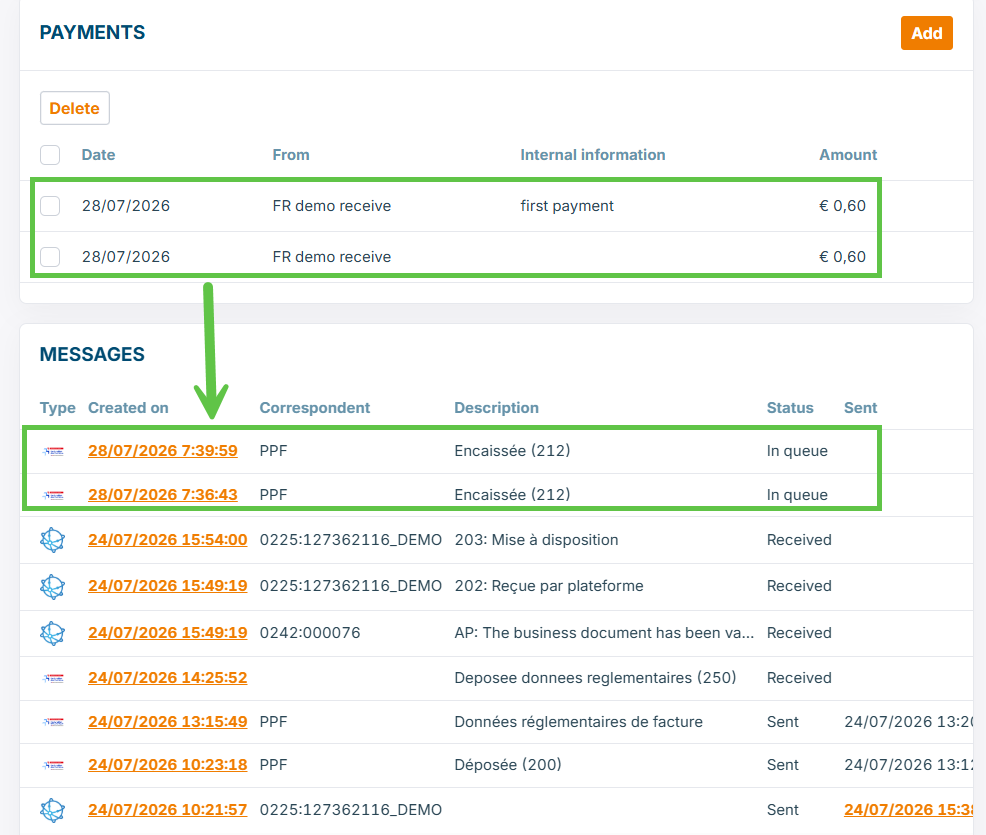
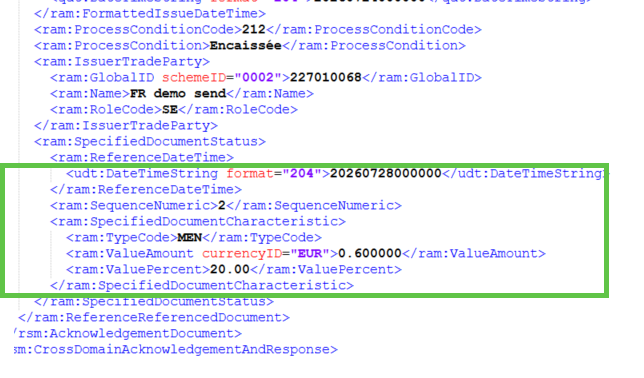
Each payment report of an invoice to the PPF (French Tax Authority) has a sequence, a timestamp and an amount:
Updated 21 days ago