
Bank Accounts
Select one or more Bank Accounts
Make sure that Bank Accounts are defined in Billit
Preparations:
- make sure multiple bank accounts are created in Billit (My Company / Bank Accounts)
- It is recommended that the bank accounts are verified (production)
Example of multiple bank accounts created in Billit:
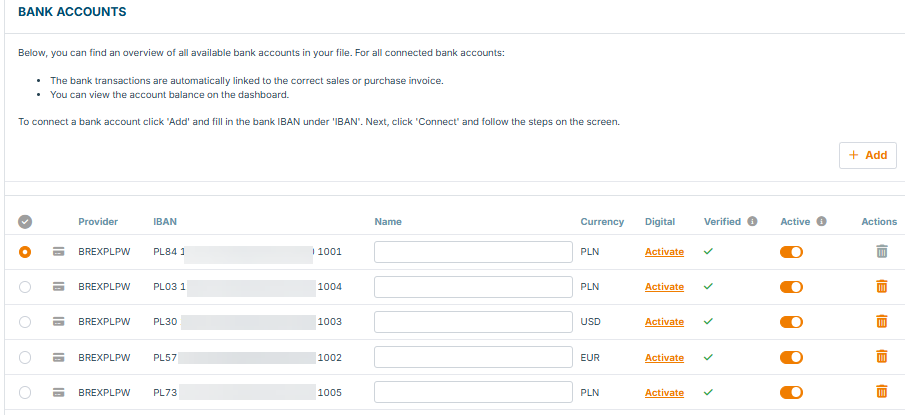
Include one bank account number in the Json body on the header level (not in the supplier segment). Example Below. If no IBAN is included, Billit will add the default bank.
When working with one Bank Account
Example of Bank info in the header of the Json:
    "IBAN": "PL30160010840004050120499999",
    "BIC": "PPABPLPK"
Add Additional Bank Account Numbers
Via custom field on header more bank account numbers can be added.
You have two options:
- First bank via IBAN, from second bank on via custom fields
- All banks in the custom fields
Example:
  "CustomFields": {
        "Faktura.Fa.Platnosc.RachunekBankowy2.NrRB" : "PL571600108400040501204999999",
        "Faktura.Fa.Platnosc.RachunekBankowy2.SWIFT" : "PPABPLPK"
    }
"CustomFields": {
"Faktura.Fa.Platnosc.RachunekBankowy2.NrRB" : "PL571600108400040501204999999",
"Faktura.Fa.Platnosc.RachunekBankowy2.SWIFT" : "PPABPLPK",
"Faktura.Fa.Platnosc.RachunekBankowy3.NrRB" : "PL571600108400040502174999999",
"Faktura.Fa.Platnosc.RachunekBankowy3.SWIFT" : "PPABPLPK"
} Result in the KSeF XML (total of 2 bank accounts)

Limitation:
- The additional bank account(s) cannot be added in case of CreditNote (KOR) (CreditNote : bank accounts are never included in KSeF XML by Billit)
Include Name and Description of the Bank Account (Header)
It might be interesting to add additional information about the bank accounts:
- Name of the bank
- Description: here you can add information : why to pay on this bank account. E.g. bank account has specific currency.
Status : available since 20/05/2026.
Examples how to set up : (3 Scenario's):
 "CustomFields": {
        "Faktura.Fa.Platnosc.RachunekBankowy.NazwaBanku": "Name of Bank",
        "Faktura.Fa.Platnosc.RachunekBankowy.OpisRachunku": "Description"
 }
"CustomFields": {
"Faktura.Fa.Platnosc.RachunekBankowy1.NazwaBanku": "Name of Bank",
"Faktura.Fa.Platnosc.RachunekBankowy1.OpisRachunku": "Description",
"Faktura.Fa.Platnosc.RachunekBankowy2.NazwaBanku": "Name of Bank",
"Faktura.Fa.Platnosc.RachunekBankowy2.OpisRachunku": "Description"
}"CustomFields": {
"Faktura.Fa.Platnosc.RachunekBankowy.NazwaBanku": "Name of Bank", // Name for the default bank.
"Faktura.Fa.Platnosc.RachunekBankowy.OpisRachunku": "Description" // description for the default bank
"Faktura.Fa.Platnosc.RachunekBankowy1.NazwaBanku": "Name of Bank",
"Faktura.Fa.Platnosc.RachunekBankowy1.OpisRachunku": "Description",
"Faktura.Fa.Platnosc.RachunekBankowy2.NazwaBanku": "Name of Bank",
"Faktura.Fa.Platnosc.RachunekBankowy2.OpisRachunku": "Description"
}Updated 5 months ago
Did this page help you?