
IBAN/BIC
Mentioning the correct bank account, Select from Multiple Bank Accounts, Factoring
Bank Account - Basic Behaviour
The correct bank account can be used:
- via the data stored in the Company screen of the MyBillit user interface.
- or launched via the Json body in the supplier element.
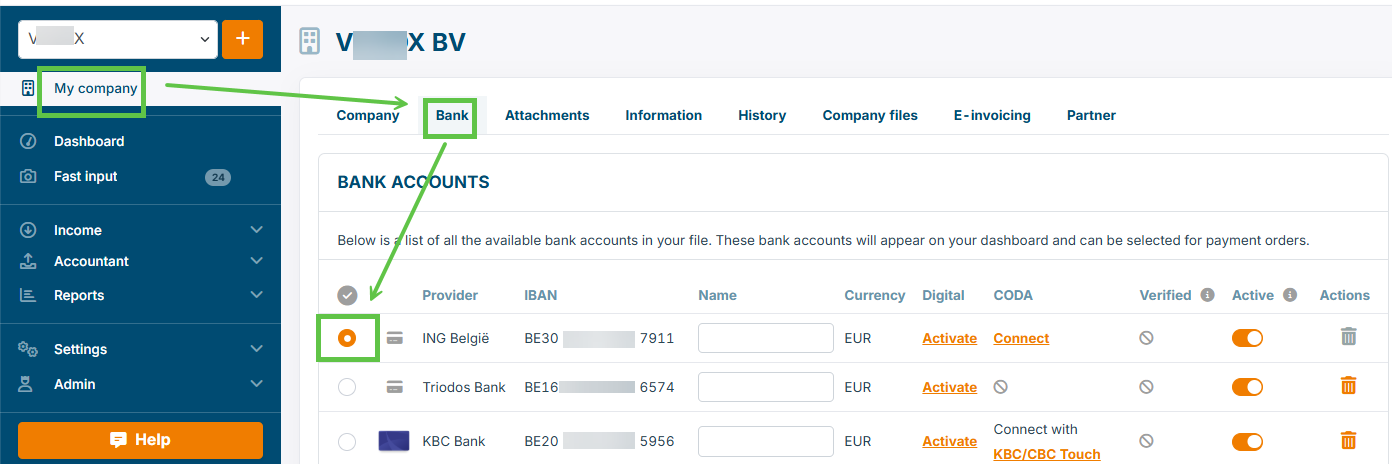
Current situation : One bank account is used. This is the bank marked as default in MyBillit User Interface.
How this can be checked in the user interface:
Select One Bank Account per Invoice
Within MyBillit, multiple bank accounts can be defined. If each invoice should have a specific bank account, then this is possible.
| Behaviour and Requirements for multiple bank accounts | Sandbox | Production |
|---|---|---|
| The bank account must occur in the list of Banks in Billit | yes | yes |
| The bank account must be verified (country code BE) | no | no (new ) |
| 1 IBAN and 1 BIC are specified in the Json file | yes | yes |
| When no IBAN or BIC is specified in the Json, then the default Bank account is included | yes | yes |
| Outgoing invoice : number of bank accounts included is limited to 1 | yes | yes |
Example Json file which includes the bank account information:
{
 "OrderType": "Invoice",
 "OrderDirection": "Income",
 "OrderNumber": "QS-0001KBC6",
 "OrderDate": "2025-11-26",
 "ExpiryDate": "2025-12-30",
 "IBAN": "BE20734054285956", // This is the IBAN that will be included for sending of this particular document
 "BIC": "KREDBEBB", // This is the BIC that will be included for sending
 "Customer": {
   "Name": "Billit",
   "VATNumber": "BE05638469442",
   "PartyType": "Customer",
   "Addresses": [
        {
        "AddressType": "InvoiceAddress",
        "Name": "Billit",
        "Street": "Oktrooiplein",
        "StreetNumber": "1",
        "City": "Ghent",
        "Zipcode": "9000",
        "Phone": "099991877",
        "CountryCode": "BE"
        },
        {
        "AddressType": "DeliveryAddress",
        "Name": "Billit",
        "Street": "Oktrooiplein",
        "StreetNumber": "1b",
        "City": "Ghent",
        "Zipcode": "9000",
        "CountryCode": "BE"
        }
   ]
   },
 "OrderLines": [
  {
   "Quantity": 1,
   "UnitPriceExcl": 1.1,
   "Description": "Box of cookies",
   "VATPercentage": 6
   }
 ]
}
In case of Factoring
Elements:
In case of factoring, the bank account to pay to is the account of the factoring company.
Current method used with API:
- Make sure that the bank account of the factoring company is in the list of the bank accounts in the MyBillit interface
- Make sure that your company is verified
- Invoices are sent in einvoice network as standard invoices. In case of Peppol, the normal invoice type codes are used.
- You can add in text field description about the factoring. E.g. in Json field comments (will also appear on human readable of Billit)
Below example were Comments and Payment terms are used to indicate use of factoring:
{
 "OrderType": "Invoice",
  "OrderDirection": "Income",
  "Comments": "Payment has been transferred to Bank XYZ Commercial Finance.  Invoice is to be paid on account of this bank.",
 "OrderNumber": "QS-0001KBC6",
 "OrderDate": "2025-11-26",
 "ExpiryDate": "2025-12-30",
 "IBAN": "BE20734054285956", // This is the IBAN that will be included for sending
  "BIC": "KREDBEBB", // This is the BIC that will be included for sending
 "CustomFields"  : {
  "PaymentTerms": "Payment has been transferred to Bank XYZ Commercial Finance.  Invoice is to be paid on account of this bank."
    },
 "Customer": {
   "Name": "Billit",
   "VATNumber": "BE05638469442",
   "PartyType": "Customer",
   "Addresses": [
        {
        "AddressType": "InvoiceAddress",
        "Name": "Billit",
        "Street": "Oktrooiplein",
        "StreetNumber": "1",
        "City": "Ghent",
        "Zipcode": "9000",
        "Phone": "099991877",
        "CountryCode": "BE"
        },
        {
        "AddressType": "DeliveryAddress",
        "Name": "Billit",
        "Street": "Oktrooiplein",
        "StreetNumber": "1b",
        "City": "Ghent",
        "Zipcode": "9000",
        "CountryCode": "BE"
        }
   ]
   },
 "OrderLines": [
  {
   "Quantity": 1,
   "UnitPriceExcl": 1.1,
   "Description": "Box of cookies",
   "VATPercentage": 6
   }
 ]
}
Updated 5 months ago
Did this page help you?