
Use more than 2 digits for Unit Price
Billit calculates the total price in order to avoid validation errors in networks such as Peppol (more info : https://docs.billit.be/docs/calculations). In your Billit environment for unit prices 2 digits are used by default. This is very common, but sometimes automated calculation of totals by Billit can calculate a minor difference in price totals.
In order to get maximum accuracy, you can increase the number of digits after the comma. You can increase this to 3, 4 or 5 (you can send more than 5, but it will be ignored). The more digits the higher the accuracy, but of course it depends also on how many digits/decimals the invoicing software can deliver.
You can use these additional decimals for 2 elements on line level:
- Unit price exluded VAT (most important to avoid rounding errors)
- Quantity (if you have quantities with digits)
If you want to activate more decimals than 2, go to the MyBillit user interface to Settings, General, and edit:

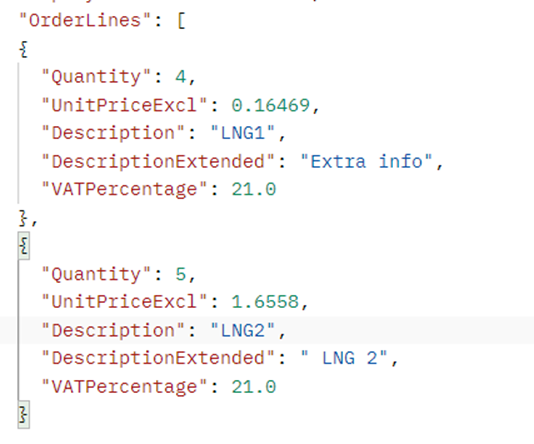
With the API you can then send unit prices with more digits on the level of invoice lines. Example:
How it will appear in the UBL :
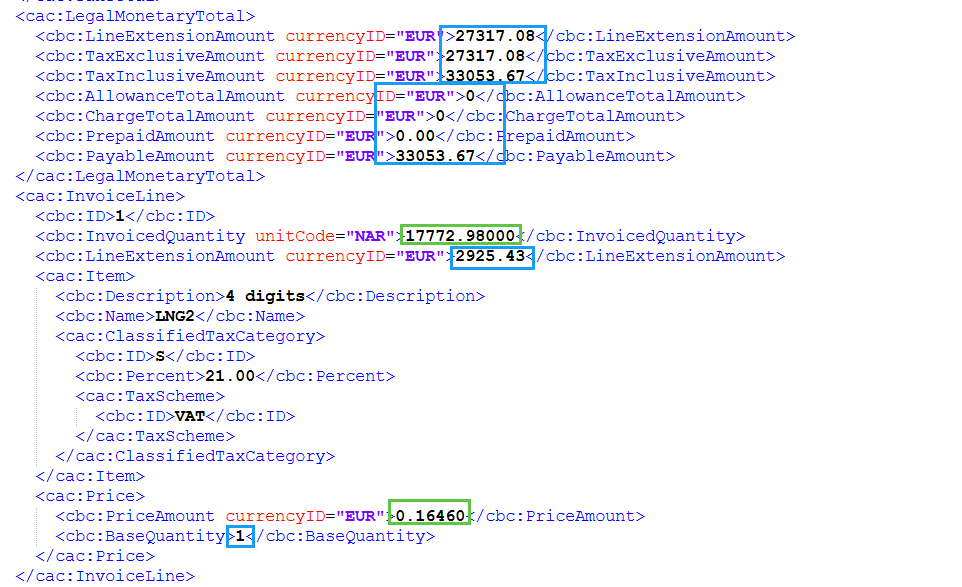
Blue : maximum 2 digits. Green : 5 digits.
Updated 10 months ago