
VAT one Country, Address second Country
Mixed Country Situation
Situation might occur for a given customer:
- Invoicing Address is for one country
- VAT number is for second country
When you post an invoice to a customer with this mixed country date, Billit might return a validation error.
Below the steps needed to get this working:
- Step 1 :
- Create Customer manually in the MyBillit user interface.
- Fill in the correct VAT number and set country to the country of the VAT number and save it.
- You will see the party id of the customer
- Step 2 : Set now the correct invoicing address and correct the country. Add additional identifier if needed (e.g. company number). Keep the VAT number.
When posting an invoice via API:
- add in your customer information in the API as mentionned in your customer list.
- you are unsure to select the right customer via the API ? then include the customer Partyid in the api.
Example
Json body of you API Posting
{
"OrderType": "Invoice",
"OrderDirection": "Income",
"OrderNumber": "QS-006test03",
"OrderDate": "2026-02-09",
"ExpiryDate": "2026-03-30",
"Customer": {
"Name": "Envalior",
"VATNumber": "BE0463037099",  //VAT customer is Belgian
"PartyID": 1028269,  //Link to customer in Billit
"PartyType": "Customer",
"Email" : "[email protected]",


"Addresses": [
{
"AddressType": "InvoiceAddress",
"Name": "Customer Name test accounting NL",
"Street": "Postbus",
"StreetNumber": "1077",
"City": "Geleen",
"Box": "",
"CountryCode": "NL"  //Country is NL
},
{
"AddressType": "DeliveryAddress",
"Name": "___",
"Street": "Urmonderbaan",
"StreetNumber": "22",
"City": "Geleen",
"Zipcode" : "6160 BB",
"Box": "",
"CountryCode": "NL"
}
]
},
"OrderLines": [
{
"Quantity": 1,
"UnitPriceExcl": 1.1,
"Description": "Box of cookies",
"VATPercentage": 6
}
]
}
Example of customer data in Billit:
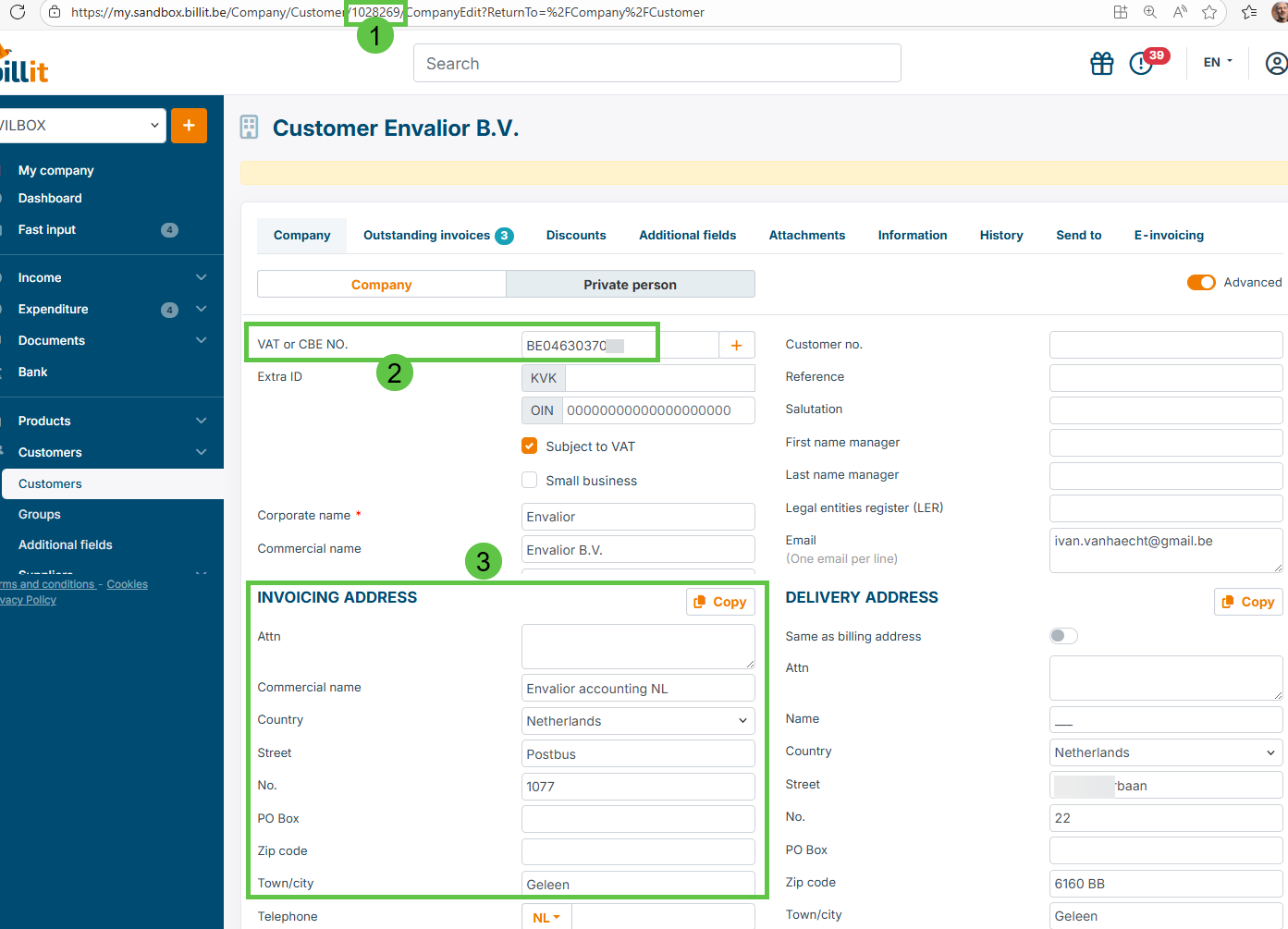
1 : PartyID of the customer
2: VAT number (Belgian VAT number
3 : Invoicing address is other country (Netherlands)
Updated 9 months ago
Did this page help you?