
Delivery Status Info in User Interface
You want to be in control of the the successful delivery and the potential feedback of the Receiver.
View Status in the MyBillit portal
Status and feedback info can be gathered via API, it is also visible on the MyBillit Portal. Status in MyBillit Portal:
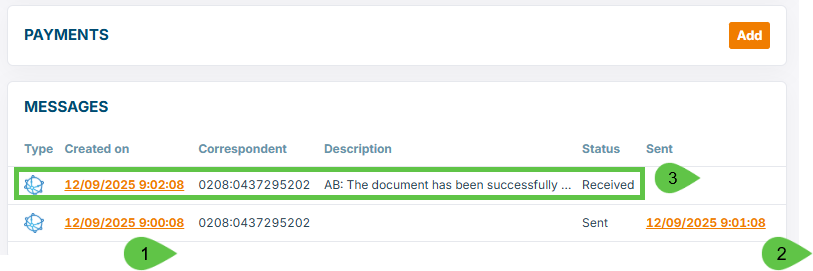
About the numbered items on the screenshot:
- Information Sent
- Peppol Icon : the TransferType is Open/Peppol
- Date and time : when clicking on it, the download of the outgoing UBL-file is started
- Endpoint scheme ID (example 0208 is for company number) and the ID : this is the identification to where it is sent
- Date and time : when clicking on it, the evidence file is downloaded (MDN). This is your proof that the file is inserted with success in the Peppol network (so the UBL file is valid, the receiver does exist in the Peppol network)
- Optional business communication from the Receiver to the sender (IMR/MLR). In this case one optional IMR-message has been received. Many receivers do not send IMR messages.
Below Example of Succesful sending without the return of an optional IMR message:

What if the receivers claims not to have received the Invoice or CreditNote ?
- Check environment: Are both parties clear that transaction is sent via the test environment (Billit sandbox) or production environment ?
- Responsibilities :
- for receiver (and access point of the receiver) is to extract the received invoice and to process it correctly in the flow.
- This is not your responsibility as a sender. More information below.
- When you have delivered with success but the receiver claims that it is not received, then the actions are:
- Communicate to what identifier you have sent (example above to 0208:0446729999 = company number of 9925:BE0446729999 is VAT-number)
- In case of doubt / discussion:
- send to the receiver 2 files:
- the evidence file to the receiver (see above screenshot point2).
- the peppol XML
- The receiver can then check with its technical support (internally and support of the AccessPoint). This should not be checked by end-users, but by technical support.
- send to the receiver 2 files:
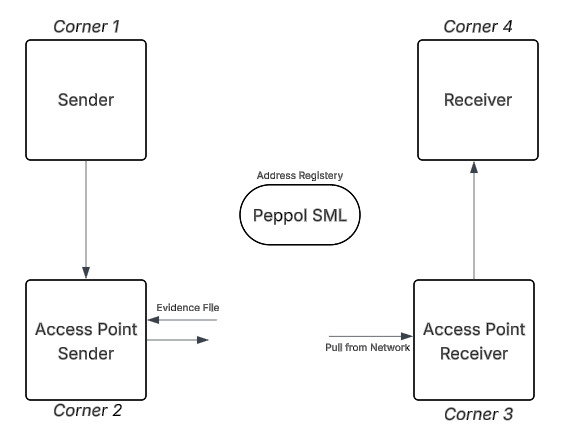
Overview of the Peppol 4-corner model:
Responsibilities:
- Access Point of the Sender (Corner 2) puts Invoice/CreditNote in the network. After successful insertion, an evidence file is gathered.
- Access Point of the Receiver (Corner 3) gathers the file, and delivers to the Receiver (Corner 4). When Sender (corner 1) can deliver an evidence file, it is up to Access Point of Receiver (Corner 3) and Receiver (Corner 4) to examine the further processing of the Invoice/CreditNote.
What if there are Issues with the delivery ?
- When the sending is launched, items will go in status In queue. Compliance check on content and registration of the receiver have been check prior to launching. User Interface:

-
If issues would occur:
- system will retry for a while
- will finally go in error
- error will be displayed on user interface in messages:
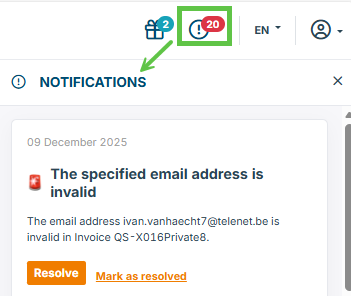
- an email will be sent if the settings are active (see further)
Audit Info at Billit
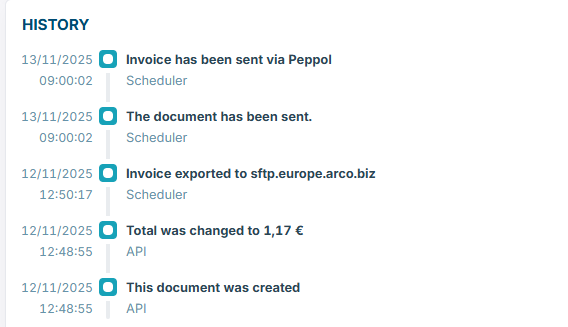
Detailed audit is stored at Billit.
User can display a summary of the data in the My Billit interface :
Get Notified per Email
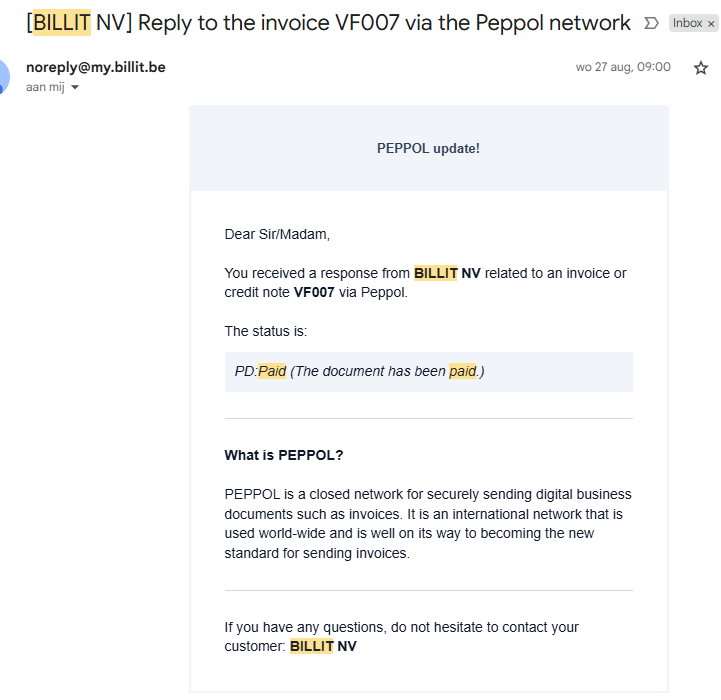
When email status notifications are activated (setting per user), then status updates will be sent via email
- per status update one email
- positive statuses and negative statuses
Below example of an email referring to the receiving of an IMR (status PD : Paid)
The email:
How to activate / deactivate the email notification setting for sales invoices:
- Menu : Settings / General / Advanced :

The second option will activate/deactivate the email notification in general.
If you want to add an email receiver who is not a Billit user:

Updated 8 months ago