For AI agents: visit https://docs.billit.be/llms.txt for an index of all pages formatted in Markdown and endpoints in OpenAPI.
Jump to Content
Billit API
API DocumentationAPI Endpoints
v1.0

API DocumentationBillit API
API Documentation
API Documentation
v1.0API DocumentationAPI Endpoints

Documentation

  • API Principles, Billit Accounts
    • Sandbox VS Production
    • Create / Verify Account
      • Basic Data
      • Identity Verification BE
      • Check Verification Status
      • Other User must Verify
      • Verification of non-Belgian Person
      • Verification of a non-Belgian Company
      • Peppol Registration
      • No Need to Receive via Billit
    • Developer Onboarding Flow
    • Authentication
      • OAuth
      • OAuth Client ID & Secret?
      • OAuth FAQ
      • PartyID and Key
    • When You are an Integration Partner
    • Activate on Production
    • Contact Support
    • Swagger / Readme / Datamodel
    • How you receive your Invoices from Billit
  • API QuickStart Sending Invoices
    • Create Sales Invoice
      • Creating Sales Invoices
      • Extra Fields : Extend Content (Header)
      • Extra Fields : Supplier and Customer Contacts
      • Extra Fields : Delivery Location
      • Extra Fields : Extend Content (Line)
      • PO number : 1 or multiple PO-numbers
    • Sending the Sales Invoice
    • PDF and Attachments
      • Include your Own PDF and Attachments
      • Billit Generated PDF
      • Billit Template Data Fields
      • General Conditions
    • Calculation of the Totals
      • Calculation Method
      • Use more than 2 digits for Unit Price
      • When You Submit Prices incl VAT
    • Credit Notes, Negative Lines
      • Credit Note
      • Custom Fields - Credit Note
      • Negative Lines on an Invoice
    • Retrieve Invoice Info and Status
      • Retrieve List of invoices
      • Get Status Info via API
      • Delivery Status Info in User Interface
      • Get Files
      • IMR : More Information
      • Webhooks for pushing e-invoice statuses
    • Who is a Einvoice Receiver
      • Peppol Receiving Capabilities
      • Check Peppol Receiving Capabilities via API
    • Send via Email : Capabilities / Deactivate if needed
    • Payment and Direct Debit
      • IBAN/BIC
      • Direct Debit
      • Payment Reference
      • PaymentTerms Note
      • Prepaid Invoice
      • Set other PaymentMeansCode
      • PaymentMethod
      • Set Billit Payment Status after Sending
    • Discounts, Charges
      • Cash Discount with simple Billit Fields
      • Commercial Discount with simple Billit Fields
      • Allowances and Charges
      • Cash Discount with Allowances Charges
      • Empties
    • Retrieve or Set Invoice Number
    • Customer Special Scenario's
      • How can I send to a specific Company Numer ?
      • Customer has Special Identifiers
      • Send to Customer with GLN Number
      • Company has no VAT number
      • Customer is Private Person
      • VAT one Country, Address second Country
      • Identifiers for Multiple Countries
    • Self-Billing
      • What is Self-Billing
      • How it works in Billit via API
      • Self-Billing Sending on My Billit Portal
      • Self-Billing Receiver Registered on Peppol
    • Data Model Billit
    • Billit just for sending, not receiving
  • API For Receiving Supplier Invoices
    • Preparation
    • Get List of Incoming Invoices
    • Get Information About 1 Invoice/CreditNote
      • Check on the MyBillit User Interface
    • Get Files
    • Status of Export
    • Non API methods for Export
    • Invoice Responses to the Sender
  • API Extra Info
    • Webhooks
      • Use webhooks to catch E-Invoice statuses
      • Verify Signature Webhook
      • Get and Delete Webhook
    • ExternalProvider data
    • Idempotent Tokens
    • Errors
      • 400
      • 401 - Unauthorized
      • 500
    • Companies
    • Products

General API Information

  • Einvoice Network environments
  • Header values
  • External Data
  • OData for Filtering
  • Party Identifiers
  • Patchable Properties
  • Types
  • Versioning
  • Ventilation Codes (VAT)
    • Ventilation Codes for Expenditure Invoices
  • API Change Log

Other Flows

  • Send Sales Invoices
    • About v1/Peppol
    • Send UBL to Peppol
    • Get the Inbox List for IMR and MLR files
    • Processing MLR and IMR files
    • Mark Inbox as Read/Confirmed (Sales)
    • Possible Errors
    • Check Validity of UBL file
  • Receive Supplier Invoices
    • Get the Inbox List for Supplier Invoices
    • Get the Invoice and CreditNote Files
    • Mark Inbox as Read/Confirmed (Purchase)

sFTP

  • sFTP Setup
  • sFTP Example for Sales Invoices
  • sFTP Example for Purchase Invoices
  • sFTP Example Sales and Purchase Invoices

Curl Command Line

  • Curl Command Line interface

COUNTRIES

  • DE Germany
    • Sales Invoices
      • Methods for sending DE
      • Identifiers DE
      • When sending per E-mail DE
      • When sending via Peppol DE
  • FR France PA
    • General Info on PA
    • Accounts, Identifiers
      • Identifiers in France
      • Setup the Companies for France
    • Create Sales Invoice PA
      • API's supported for PA
      • B2B Sending Flows
      • Content Requirements PA
      • How to Find a Receiver in France
      • Tax Codes PA in France
      • Messages and Status
      • Testing Procedures
    • Receiving Invoices PA
      • Info Receiving PA
    • Special Used Cases - Overview - PA
      • Special Used Cases - Overview - PA
    • FAQ France PA
    • E-Reporting PA
  • PL Poland KSeF
    • General Info on KSeF
    • Create KSeF Sales Invoices
      • API's supported for KSeF
      • Billit Data model for KSeF
      • Extra KSeF Fields (Advanced)
      • Tax Codes KSeF
      • Other currency than PLN
      • Send to Country outside Poland
      • Split Payment / Reverse Charge
      • Prepaid Invoices
      • Bank Accounts
    • Sending to KSeF
    • GET Feedback KSeF Sales Invoices
    • Receive KSeF Purchase Invoices
    • Billit Generated PDF with KSeF Info
    • FAQ KSeF
    • Specific Types
      • Corrective Invoice - KOR - KSeF
      • Advanced/Settlement Invoices
Powered by 

Data Model Billit

In order to download the file in Excel format : Excel Datamodel Download

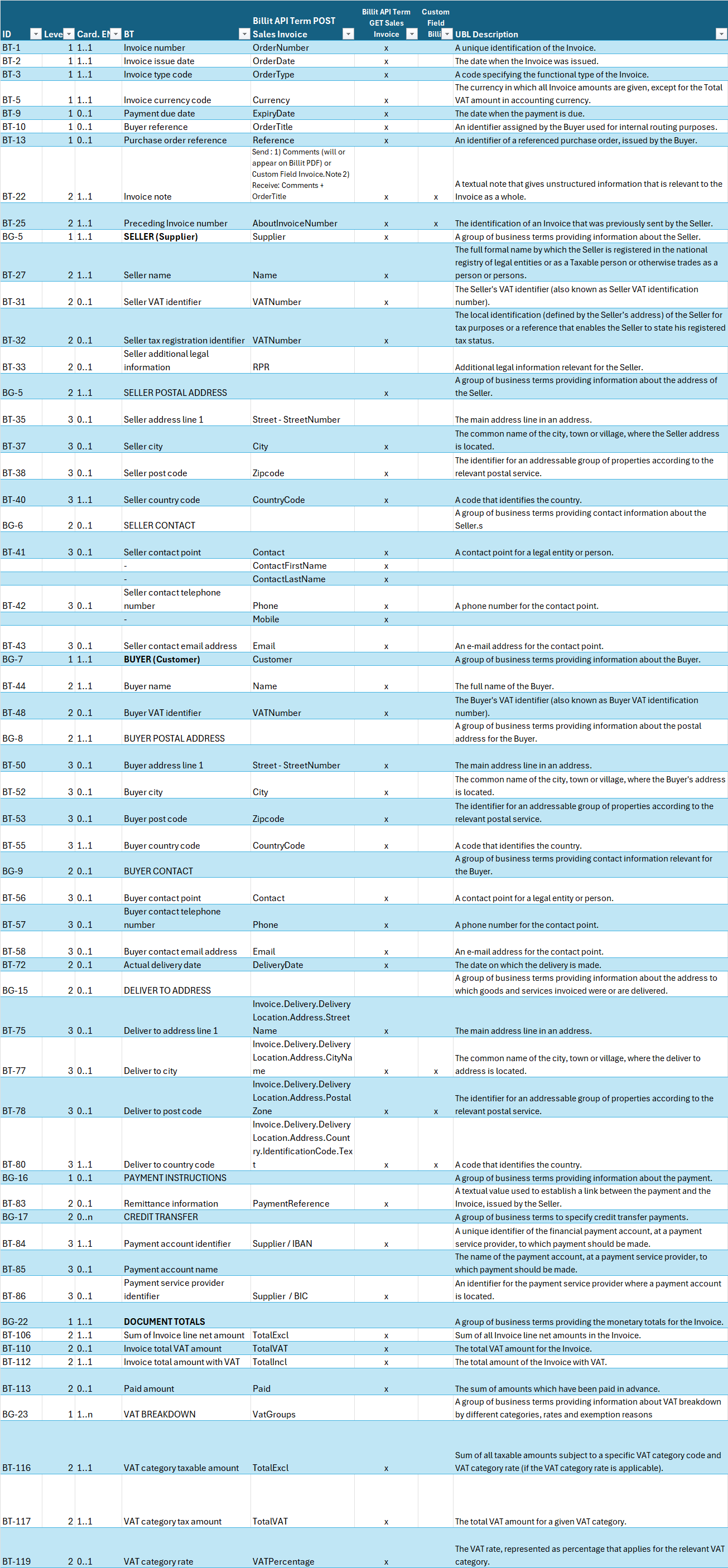
Main data model elements on header level:
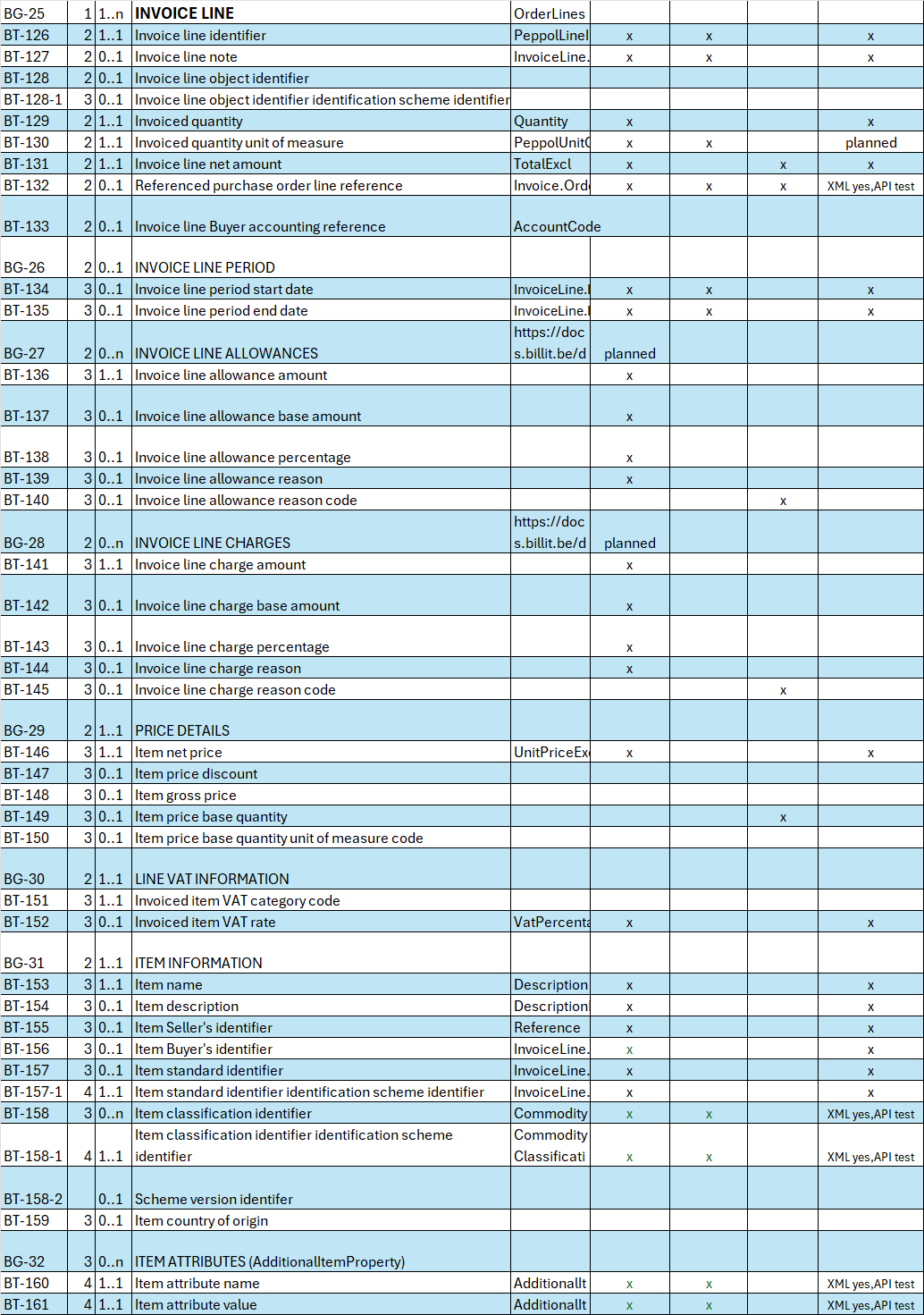
Main data model elements on line level:


Updated 2 months ago


Self-Billing Receiver Registered on Peppol
Billit just for sending, not receiving