
Self-Bill and Franchise en base de TVA
General Guidelines
Self-bill is posted,
keeping in mind general guidelines for Self-Bill and Franchise en base de TVA.
When VAT is 0, then ventilation code is set to "VentilationCode" is 1 in case of Self-Bill (expenditure). It is enough that this is set on header level, if it is repeated on each line then the result is the same.
2 specific data elements need to be set:
| Data element | How to set the data element |
|---|---|
| VATLiable : false | API in invoice payload |
| SmallEnterprise : true | API in invoice payload |
Set the fields in the invoice payload.
Invoice Payload : set VATLiable to false and SmallEnterprise to true.
Below an example of the Supplier section of the API payload of the Self-Bill Invoice or CreditNote.
        "Supplier": {
            "Name": "EVstudio",
            "VATNumber": "",
            "PartyType": "Supplier",
            "VATLiable": false,
            "SmallEnterprise": true,
            "Addresses": [
                {
                    "AddressType": "InvoiceAddress",
                    "Name": "Company Name",
                    "Street": "9 Rue Test",
                    "City": "Strasbourg",
                    "Zipcode": "67000",
                    "CountryCode": "FR"
                }
            ],
            "Identifiers": [
                {
                    "IdentifierType": "SIREN",
                    "Identifier": "791341999",
                    "Preferred": false
                },
                {
                    "IdentifierType": "CTC",
                    "Identifier": "791341999",
                    "Preferred": false
                }
            ]
        },
Set Supplier Info via API v1/parties (FYI)
You can set info in the supplier data via v1/parties. Keep in mind that if you include data in the invoice payload, you will then update the supplier info again.
Actions to launch :
- Command : POST https://api.sandbox.billit.be/v1/parties
- Header : include PartyID of the company
- Body : content of the supplier
Example of the Posting:
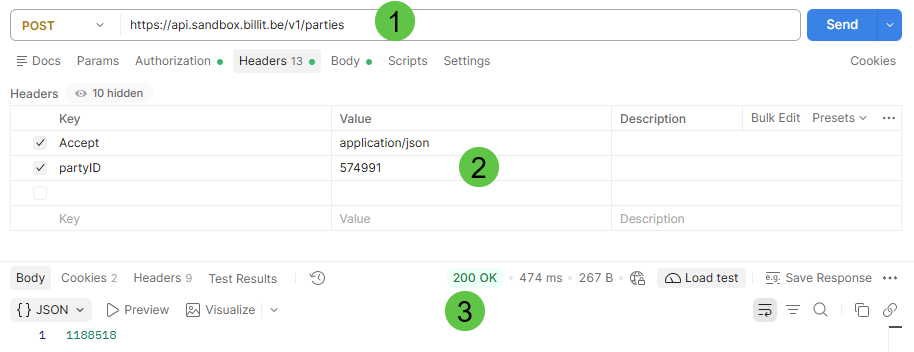
Extra info:
- URL of the posting (based on v1/parties)
- PartyID of the company
- Result of the posting : 200 OK is success, ID of the created or updated Supplier is returned
Example of the content:
{
    //"PartyID": 738332,  Not required
    "Nr": "S14",  //Not required
    "Name": "Killian TESTNOM",
    "Addresses": [
        {
            "AddressType": "InvoiceAddress",
            "Name": "Supplier Name",
            "Street": "2 Rue Du Hameau",
            "StreetNumber": "17",
            "Box": "12",
            "Zipcode": "63200",
            "City": "Cellule",
            "CountryCode": "FR"
        }    ],
    "Email": "[email protected]",
    "VATNumber": "",  //Scenario : no VAT number
    "PartyType": "Supplier",  //is Supplier, Not customer
    "VATLiable": false,  //can be set via this API invoice or via v1/parties    "Language": "FR",
    "VentilationCode": "4",
    "Identifiers": [  //needed to identify to supplier
        {
            "IdentifierType": "Siren",
            "Identifier": "941810099",
            "SchemeID": "0002",
            "Preferred": false,
            "IdentifierAddress": ":941810099"
        },
         {
            "IdentifierType": "CTC",
            "Identifier": "941810099",
            "SchemeID": "0225",
            "Preferred": false,
            "IdentifierAddress": ":941810099"
        }
    ],
    "SmallEnterprise": true,  //the element that must be updated
}
Updated 11 days ago