
Send to Customer with GLN Number
Why do Customers use GLN numbers ?
Certain organisations have specific reasons:
- multiple independant structures with the same VAT or company number
- special routing requirements
General info : https://www.billit.eu/en-int/help-page/income/invoices/what-is-a-gln-number/
How to send to a GLN receiver from the API
In API Json body, in the segment "Identifiers" the Identfier type GLN is used.
{
 "OrderType": "Invoice",
 "OrderDirection": "Income",
 "OrderNumber": "QS-001",
 "OrderDate": "2025-09-01",
 "ExpiryDate": "2025-10-30",
  "Customer": {
   "Name": "Billit",
   "VATNumber": "BE0563846944",
   "PartyType": "Customer",
   "Identifiers": [
        {
        "IdentifierType": "GLN",  //Additional Identifier GLN
        "Identifier": "5430003732007"
        }
    ],
   "Addresses": [
        {
        "AddressType": "InvoiceAddress",
        "Name": "Billit",
        "Street": "Oktrooiplein",
        "StreetNumber": "1",
        "City": "Ghent",
        "Zipcode" : "9001",
        "Box": "box1",
      	"Email" : "[email protected]",
        "Language" : "NL",
        "CountryCode": "BE"
        }
   ]
   },
 "OrderLines": [
  {
   "Quantity": 1,
   "UnitPriceExcl": 10.0,
   "Description": "Box of cookies",
   "DescriptionExtended": "Box of cookies 20 pieces, 200 g",
   "Reference": "915025",
   "VATPercentage": 6
   }
 ]
}
As a result of this POST, the customer info in Billit will be updated with this GLN information. You can check this in the MyBillit user interface:
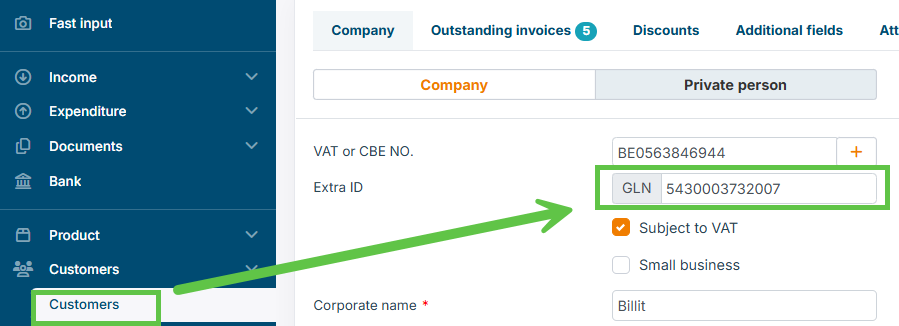
In case of Open/Peppol, what customer endpoint ID will be used:
- if the customer is only registered on the network Peppol with the GLN number: the GLN number will be used
- If the customer is registered with GLN + other identifiers such as VAT or company number : Billit will automatically select an identifier, typically first company number and if not available then VAT number.
- If you want to force the use of GLN number, then 2 methods can be applied.
- method 1 : this can be done via the MyBillit User Interface, see screenshot below:
- If you want to force the use of GLN number, then 2 methods can be applied.
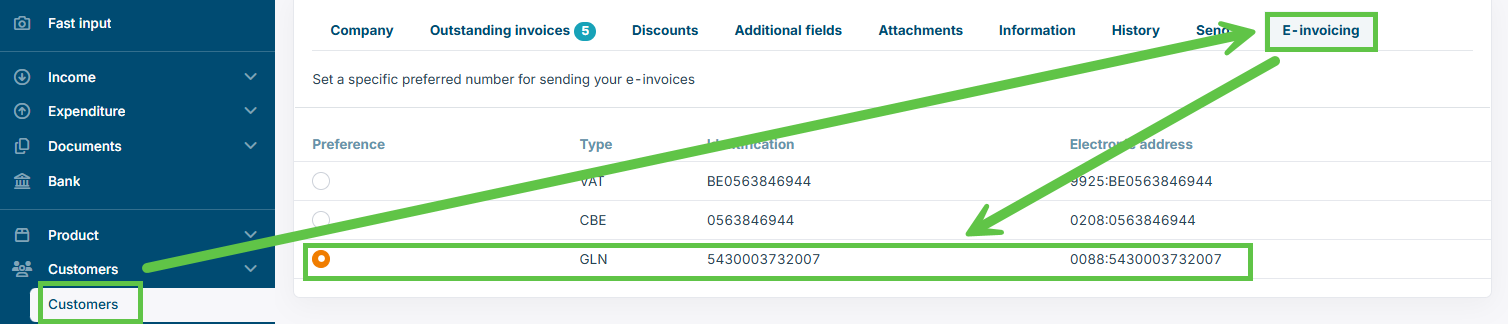
- method 2 : included the "preferred" element in the extra identifiers of the API content.
{
 "OrderType": "Invoice",
 "OrderDirection": "Income",
 "OrderNumber": "QS-001",
 "OrderDate": "2025-09-01",
 "ExpiryDate": "2025-10-30",
  "Customer": {
   "Name": "Billit",
   "VATNumber": "BE0563846944",
   "PartyType": "Customer",
   "Identifiers": [
        {
        "IdentifierType": "GLN",  //Additional Identifier GLN
        "Identifier": "5430003732007"
				"Preferred": true  // This will be the Peppol identifier that will be used to send to
        }
    ],
   "Addresses": [
        {
        "AddressType": "InvoiceAddress",
        "Name": "Billit",
        "Street": "Oktrooiplein",
        "StreetNumber": "1",
        "City": "Ghent",
        "Zipcode" : "9001",
        "Box": "box1",
      	"Email" : "[email protected]",
        "Language" : "NL",
        "CountryCode": "BE"
        }
   ]
   },
 "OrderLines": [
  {
   "Quantity": 1,
   "UnitPriceExcl": 10.0,
   "Description": "Box of cookies",
   "DescriptionExtended": "Box of cookies 20 pieces, 200 g",
   "Reference": "915025",
   "VATPercentage": 6
   }
 ]
}
A Customer has 1 VAT/Company-number and Multiple GLN-numbers
In this case the customer is using the same VAT and/or company number for all the registered GLN-numbers.
As Peppol registration is concerned:
- the customer has registered multiple GLN numbers, but no VAT number and company number
- the customer has registered multiple GLN numbers + the VAT number and company number
Actions:
- Create the different customers manually in My Billit
- Each customer will have the the same VAT-number but a different GLN
- Check in the Customer E-invoicing tab that the GLN-number is set as the preferred method
- Find the partyID in Billit for each GLN-based customer
- Include the partyID in your API Body in the customer section when posting the invoice
How to get the PartyID of the customer:
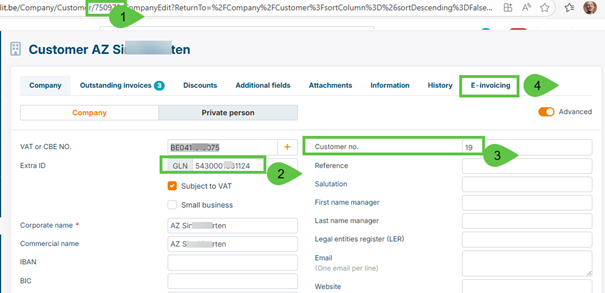
The Json body must include the PartyID of the Customer in the customer segment. See example below.
{
 "OrderType": "Invoice",
 "OrderDirection": "Income",
 "OrderNumber": "QS-XGLNVK003",
 "OrderDate": "2025-10-08",
  "Reference": "4573er6780",
 "ExpiryDate": "2025-10-30",
  "Customer": {
   "Name": "AZ Voorkempen",
   "VATNumber": "BE0411515075",
   "PartyType": "Customer",
    "PartyID": 822753,  // PartyID must be included in order to select the correct customer
    "Nr": "28",
   "Identifiers": [
                {
        "IdentifierType": "GLN",  // GLN must be included as identifier
        "Identifier": "5430001361018"
        }
    ],
   "Addresses": [
        {
        "AddressType": "InvoiceAddress",
        "Name": "AZ Voorkempen",
        "Street": "Oude Liersebaan",
        "StreetNumber": "4",
        "Zipcode": "2930",
        "City": "Ghent",
        "Box": "",
        "CountryCode": "BE"
        }
   ]
   },
 "OrderLines": [
  {
   "Quantity": 1.02,
   "UnitPriceExcl": 10.03,
   "Reference": "915025",
   "Description": "Box of cookies",
   "VATPercentage": 6.0
   },
    {
   "Quantity": 2,
   "UnitPriceExcl": 3.75,
   "Description": "Sticks",
   "VATPercentage": 21.0
   }
 ]
}
Alternative for Customer PartyID:
Customer PartyID is the most direct way for Billit to detect the right customer and select the preferred endpoint ID.
Alternative is not to include the PartyID.
Billit will then perform a lookup based on VAT + the additional identifier GLN, in order to find the customer, and will then select the customer. The customer with the GLN identifier must then be unique in the Billit customer list.
A Customer has 1 VAT-number 1 and several GLN-numbers, per Invoice the selection is different
When you want to send to a customer who wants to receive certain invoices with GLN number, and/or other invoices with VAT number, then the solution is:
- Create several customers manually in Billit.
- One has in the E-invoicing tab the VAT-number as preferred method, the other has GLN-number as preferred method
- Get the PartyID of each customer
- When Posting your Invoice:
- Include the correct PartyID:
- In Billit the customer will be selected based on the PartyID. The selected endpoint type of that PartyID will be used (the GLN number) for sending the invoice.
- How to include the PartyID in Json body : see example in "A Customer has 1 VAT-number and Multiple GLN-numbers"
- Include the correct PartyID:
How can I check that invoice has been sent to the GLN-number
In the MyBillit user interface, the Correspondent is market with 0088 schemeID, indicating that GLN number is used:

You can download the UBL and check the AccountingCustomerParty/Party/EndpointID:

Via the the API, you can ask Feedback via the GET V1/order command (more info : https://docs.billit.be/docs/status-content-of-a-sales-invoice).
In the Messages segment you will find in Destionation the endpoint used:
   "Messages": [
        {
            "FileID": "0628ac71-ba2a-4ea0-a0da-871a8099999",
            "CreationDate": "2025-12-10T09:00:44.53",
            "TransportType": "Peppol",
            "Success": true,
            "Trials": 1,
            "Destination": "0088:5430001361018",
            "MessageDirection": "Outgoing"
        }
    ]
Updated 4 months ago