
Send via Email : Capabilities / Deactivate if needed
Send via Email if no Peppol or einvoicing receiving capability - How to enable / disable if needed
What Happens when Receiver is not on Einvoice Network - TransportType is set via API
In the Billit API, you can send your invoices using the commands/send API endpoint. This endpoint allows you to specify a transport type.
When using Peppol as the TransportType, (or another einvoice network)
- If the customer is registered on the Peppol network, then normal delivery via Peppol will happen.
- Remark : on the Peppol test network much less companies are registered than on production.
- If the customer is not registered on the E-Invoice network,
- No alternative sending via email will be launched (new since February 2026)
- An error will be returned (immediately).
- Why : in more and more countries and networks, delivery via the e-invoice network is mandatory, alternative sending via email is not replacing the legal obligation to deliver via the network
Example of Launching the sending via API with a specific einvoice network:
Command:
| Endpoint | Method | Response |
|---|---|---|
| /v1/orders/commands/send | POST | OK |
Example when TransportType Peppol:
{
"Transporttype" : "Peppol",
"OrderIDs" :
  [
	1684998,
	1684999
  ]
}
What error will be returned ?
{
    "errors": [
        {
            "Code": "TheCustomerIsNotActiveOnPeppol",
            "Description": "The customer is not active on Peppol."
        }
    ]
}
What if you still want to send via Email
- Launch a new sending via Email (via API, as an end-user)
What if you want to allow automatic alternative sending via Email
When you want to keep the alternative sending via Email when the receiver is not on the e-invoice network, you can launch the sending via API without mentioning the TransportType.
What will happen:
- when the einvoice network is available, this network will be used for sending
- when the einvoice network is not available, sending will happen via email if the email address is available
Endpoint and Method
| Endpoint | Method | Response |
|---|---|---|
| /v1/orders/commands/send | POST | OK |
Launching the sending without TransportType:
{
"OrderIDs" :
  [
	1684998,
	1684999
  ]
}
If If your only goal is to send via Email
If you know in advance that sending via Email is to way to go, this can directly be included in the Transport Type.
| Endpoint | Method | Response |
|---|---|---|
| /v1/orders/commands/send | POST | OK |
{
"Transporttype" : "SMTP",
"OrderIDs" :
  [
	1684998,
	1684999
  ]
}
Information to include when sending per Email
The following elements are important for email sending
| Information element | Tag Name | Sample value |
|---|---|---|
| Email address Customer | "[email protected]" | |
| Language Customer | Language | "NL" |
Examples : Below delivery feedback is available (feedback via GET v1/order)
"AccountantVerificationNeeded": false,
    "CurrentDocumentDeliveryDetails": {
        "DocumentDeliveryDate": "2026-02-18T07:05:34.397",
        "DocumentDeliveryInfo": "",
        "IsDocumentDelivered": true,
        "DocumentDeliveryStatus": "Delivered"
    },
    "Messages": [
        {
            "Description": "",
            "FileID": "e3b75f94-6fb8-416b-afb5-c52eb4a49f6f",
            "CreationDate": "2026-02-18T07:04:28.313",
            "TransportType": "SMTP",
            "Success": true,
            "Trials": 1,
            "Destination": "[email protected]",
            "MessageDirection": "Outgoing"
{
"OrderType": "Invoice",
"OrderDirection": "Income",
"OrderNumber": "QS-001",
"OrderDate": "2025-09-01",
"ExpiryDate": "2025-10-30",
"Customer": {
"Name": "Billit",
"VATNumber": "BE0563846944",
"PartyType": "Customer",
"Email" : "[email protected];[email protected]",
"Language" : "NL",
"Addresses": [
{
"AddressType": "InvoiceAddress",
"Name": "Billit",
"Street": "Oktrooiplein",
"StreetNumber": "1",
"City": "Ghent",
"Zipcode" : "9001",
"Box": "box1",
"CountryCode": "BE"
}
]
"OrderLines": [
{
"Quantity": 1,
"UnitPriceExcl": 10.0,
"Description": "Box of cookies", // In peppol will come in the field name
"DescriptionExtended": "Box of cookies 20 pieces, 200 g",
"Reference": "915025",
"VATPercentage": 6
}
]
}When auto-sending the next day at 9 am is activated
Then method is:
- Will send by the default einvoicing channel
- If receiver is not in the default einvoicing channel, then delivery will be per email if the email address is provided
Avoid Sending via alternative Channel such as Email
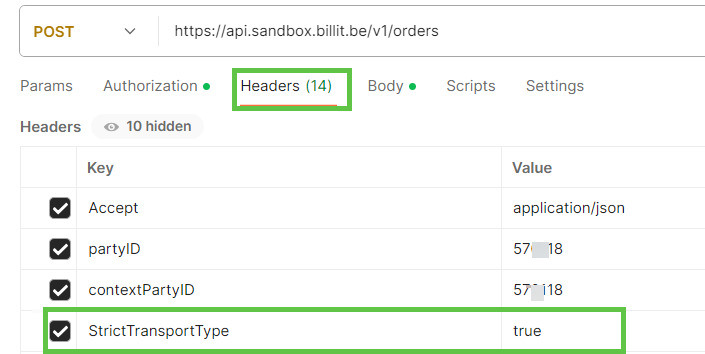
By setting the StrictTransportType header to true, the system will prevent sending the invoice via email and will instead throw a validation error if the customer is not registered on the Einvoicing network such as Peppol.
This ensures that invoices are only sent through the specified transport type, no alternatives are tried.
Below an example of the use of StrictTransportType on header level in Postman:
When Email sending is in the Sandbox environment
In case of Email sending in the Sandbox environment, the email will be sent to the email address defined for the customer in the sandbox. The email address might be the production email address of the customer, so this could confuse the receiving customer. To avoid issues, you can use another email address, e.g. you own testing email address.
Sending Email to multiple Email Receivers
When launching the POST v1/order command, you can include more than 1 email address in the Json body:
{
 "OrderType": "Invoice",
 "OrderDirection": "Income",
 "OrderNumber": "QS-001",
 "OrderDate": "2025-09-01",
 "ExpiryDate": "2025-10-30",
  "Customer": {
   "Name": "Billit",
   "VATNumber": "BE0563846944",
    "PartyType": "Customer",
    "Email" : "[email protected];[email protected]",
    "Language" : "NL",
   "Addresses": [
        {
        "AddressType": "InvoiceAddress",
        "Name": "Billit",
        "Street": "Oktrooiplein",
        "StreetNumber": "1",
        "City": "Ghent",
        "Zipcode" : "9001",
        "Box": "box1",
        "CountryCode": "BE"
        }
   ]
 "OrderLines": [
  {
   "Quantity": 1,
   "UnitPriceExcl": 10.0,
   "Description": "Box of cookies",
   "DescriptionExtended": "Box of cookies 20 pieces, 200 g",
   "Reference": "915025",
   "VATPercentage": 6
   }
 ]
}
Email Sending Generates Error : Validate Email Address
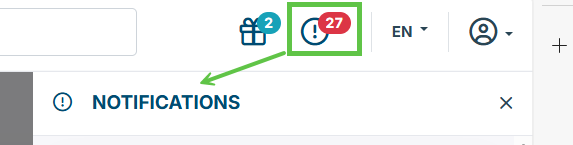
When the email sending is launched, but executing does not succeed with the error that email address must be valided, then this validation needs to be done. The error will also appear in your notification center.
It refers to the email address on the My Company screen:
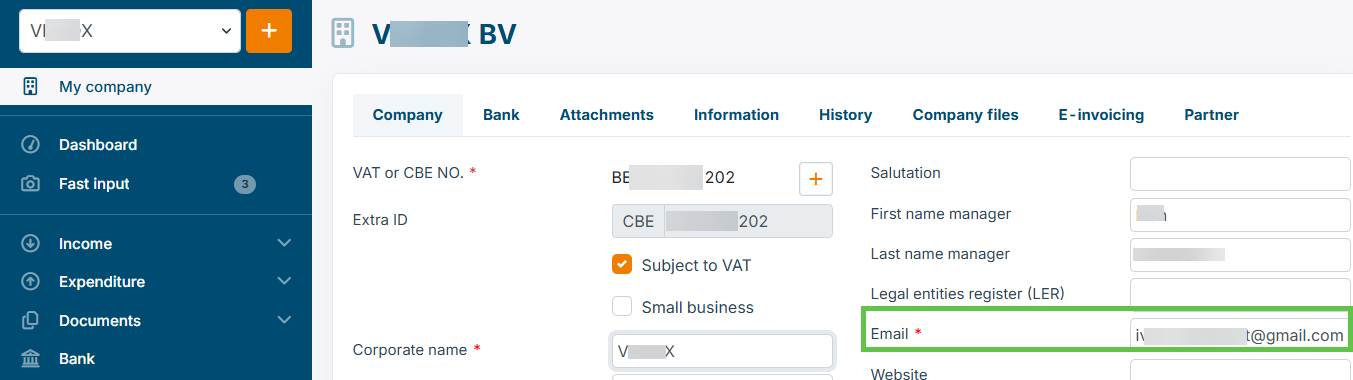
On account creation, an email has been sent asking to click on it and login with your user. You will then be able to start sending emails.
In your notification screen, you will see a message and you can trigger to relaunch the sending of the verification email again.
Notifications screen:
Updated 4 months ago