
Commercial Discount with simple Billit Fields
Commercial Discounts easy to use
Commercial Discount
On the invoice line:
- scenario 1 : you can mention a the line net price (no indication of commercial discount)
- scenario 2 : you can include the line discount information as a percentage. (if customer wants to know the discount details)
Input information in the API Json body
| Property | Sample Value | Info |
|---|---|---|
| ReductionPercentage | 25 | Discount percentage |
Example:
{
 "OrderType": "Invoice",
 "OrderDirection": "Income",
 "OrderNumber": "QS-50001",
 "OrderDate": "2025-09-15",
 "ExpiryDate": "2025-10-30",
  "Customer": {
   "Name": "Customer Name",
   "VATNumber": "BE0759529999",
   "PartyType": "Customer",
   "Addresses": [
        {
        "AddressType": "InvoiceAddress",
        "Name": "Customer Name",
        "Street": "Oktrooiplein",
        "StreetNumber": "1",
        "City": "Ghent",
        "Zip": "9000",
        "CountryCode": "BE"
        },
   ]
   },
  "OrderLines": [
            {
              "Quantity": 14,
              "UnitPriceExcl": 2.23,
              "Description": "my order line1",
              "ReductionPercentage": 25,  // % commercial discount
              "VATPercentage": 21.0
            }
            ],
}
Below an example how it will be included in the UBL when it is sent via Open/Peppol (Allowance on line level) :
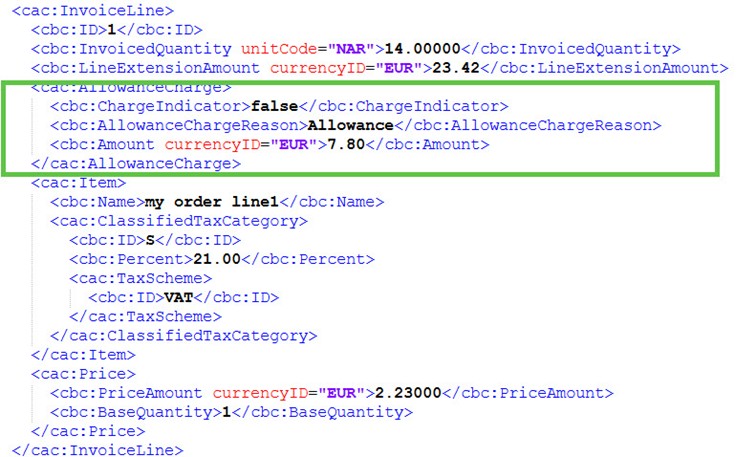
Specific fields in the UBL:
| Property | Sample Value | Info |
|---|---|---|
| 1 | ChargeIndicator | false : it is a discount |
| 2 | AllowanceChargeReason | fixed text set by Billit : allowance |
| 3 | Amount | Total amount of the line discount, calculated by Billit based on ReductionPercentage |
Updated 7 months ago
Did this page help you?