
Verification of a non-Belgian Company
Company must be verified for sending on Sandbox and Production
Company verification
You might have a setup per company on sandbox and on production. Both need to be verified before starting the sending.
Steps:
- Create company on sandbox and fill in mandatory data
- Create company on production and fill in mandatory data
- Start verification process on production. Add in comments that you also need to get verification on sandbox (include partyid). How to start verification: https://www.billit.eu/en-int/help-page/identity-verification/for-non-belgian-companies/
Optional Bank Account Verification
If your company is verified, this is enough for sending. You can also verify the bank.
Method 1 : direct interactive verification with the online bank
This is the normal procedure. It can be performed on the production and the sandbox environment.
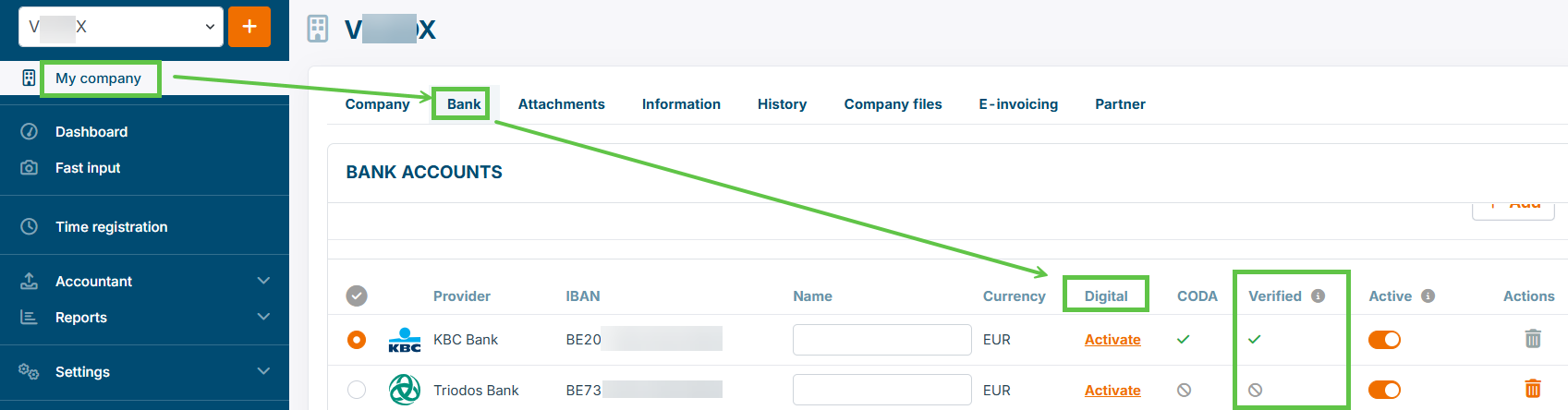
If method 1 cannot be applied, see method 1 and 2.
Method 2: Manual Payment
First Request the ID number of your bank account at Billlit. Can only be activated on production environment.
Make the following manual payment:
- Amount: 0,10
- Currency : Euro
- Bank account to pay to:
- IBAN : BE06 7360 6555 8122
- BIC : KREDBEBB
- Bank : KBC Belgium
- Description of the bank transaction : the unique ID of the bank account, delivered by Billit, typically 5 digits.
After a short while, the bank account will be set to Verified automatically.
Method 3 : Manual validation of bank account
Why this can be needed:
- on sandbox, method 2 is not available
- In case of factoring : bank account is of .
Then a request is send to Compliance, as for Sandbox environment (see below)
Manual Bank Account Verification
When method 1 and 2 cannot be executed, then manual bank account verification the solution.
You can verify the bank on sandbox and production with one request.
What information is needed:
- Include the context :
- scenario 1 : bank account verification on the sandbox environment
- Add info (per active bank account, for each company)
- Company Info
- Company name.
- VAT number.
- Environment : Production / Sandbox or both.
- PartyID :
- if production + sandbox then add partyID for both
- where to find PartyID: PartyID
- Country.
- Bank Account Number(s):
- Make sure that the bank accounts are already added in My Company / Bank in Billit
- Deliver the bank number
- Company Info
- Add document:
- Bank details document. Also Called RIB (Relevé d’Identité Bancaire) or Bank Identity Statement. This is a document that you can typicaly download as a PDF from your online bank application or get from your Bank on Request.
- If you have 2 companies with 2 bank accounts each, then we need 4 RIB or Bank Identity Statement documents.
- How to deliver the information : send to [email protected]
- Billit will perform verification. Bank will be set to verified and you will receive a confirmation email. You can then start sending.
Updated 5 months ago