
Testing Procedures
Testing on sandbox is possible based on specific procedure explained below
What can be tested on the sandbox environment
The following preparation must be done first. Read this carefully and execute all the steps:
- create your sending company on sandbox + setup integration for France and Peppol registration. More info : https://docs.billit.be/docs/create-account-and-french-integration
Context of the testing:
- Billit environment : sandbox
- Sending company : the company you created
- When launching the sending via Billit
- Step 1 : Communication with the PPF (French Tax Authority) :
- Method : this is be mocked. What does it mean : Billit simulates this communication with the French Authority (Flux 1, Flux 6), allowing you to test in spite of many restrictions.
- Goal of this operation : You will be able to understand what are the types of messages and status information you can get back
- Step 2 : send via Open/Peppol : real sending to the restricted number of receivers available on the test network.
- Step 1 : Communication with the PPF (French Tax Authority) :
Which receivers are available on the test network ?
Constraint : Only a very limited number of receivers are available on the French test network, as the allowed use is very limited.
Below the options:
- You can upload your customer list in the Billit sandbox and check which customers are on the Peppol network. Ideally, they are also registered with the CTC extension (identifier scheme 0225) and with correct document types.
- If you have more than 1 French company, you can create the second company, this company will act as a receiver.
- You can send to a Billit test receiver. Info see below.
Billit test receiver simulating a positive delivery
- Data about the company
- Name : FR demo receive
- VAT : FR37127362116
- Siren : 127362116
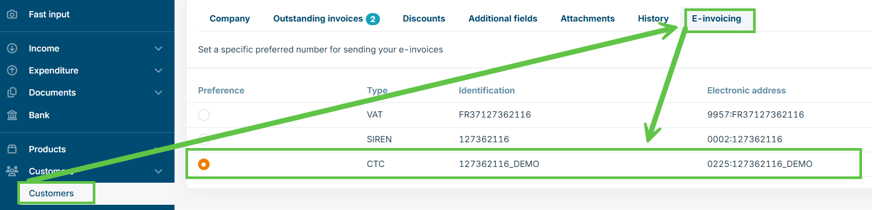
- CTC : 127362116_DEMO
- Make sure that the CTC is used as customer endpoint ID. You can set this in the MyBillit User Interface in the following way:
Billit test receiver simulating a negative feedback from the French Authority
You can create a test customer with following data
- Name : VAT : FR37127362116
- VAT : a valid French VAT number of choice (must be filled in)
- Siren : 127362116
- CTC : this must be 227010068_ERROR. Set as E-invoicing Routing Preference the CTC.
- Address : fill in the French address with test data of choice
Billit test receiver only receiving document type FacturX
-
Name : FR Demo Receive FacturX
-
VAT : FR37127362116
-
Siren : derived from the VAT number, e.g. 127362116
-
CTC : this must be 127362116_DEMORECEIVEFACTURX. Set as E-invoicing Routing Preference the CTC.
-
Address : fill in the French address with test data of choice
What will you see in the MyBillit user interface after sending ?
More info : https://docs.billit.be/docs/communication-from-receiver-to-sender-pa
Updated 3 months ago
Did this page help you?