
Direct Debit
Direct Debit / Domiciliëring / Automatisch Incasso
How to Use it
Direct debit is a payment method that allows a business or organization to automatically withdraw money from a customer's bank account, usually on a recurring basis.
It is supported when sending over Open/Peppol.
The following information must be communicated for a valid use:
| Information Element | Value | Description | In what segment | Mandatory for Billit when Domiciliation | Mandatory for Peppol |
|---|---|---|---|---|---|
| DefaultPaymentMethodTC | "Domiciliation" | Fixed Value | Customer | Yes | |
| PaymentMethod | "Domiciliation" | Fixed Value | Header | Yes | |
| DomiciliationMandateID | Example : "100000101 | The ID that you have obtained for the mandate. Billit checks the Regex structure of the mandateID. | Customer | Yes | Yes |
| DomiciliationMandateSigningDate | Example : "2023-12-05" | Date that the mandate was signed | Customer | Yes | No |
Below an example of a Json body for an invoice to be posted with a direct debit.
{
	"OrderNumber": "001directdebit11a",
	"OrderDate": "2026-02-06",
	"ExpiryDate": "2026-03-30",
	"OrderType": "Invoice",
	"OrderDirection": "Income",
  "Currency": "EUR",
  "PaymentMethod": "Domiciliation",  // Fixed value to include when direct debit is used
  "Customer": {
    "Name": "TestCustomer",
    "PartyType": "Customer",
		"Street": "Teststraat 31",
		"Zipcode": "BE-9000",
		"City": "GENT",
		"CountryCode": "BE",
		"Email": "[email protected]",
		"VatNumber": "BE0437295999",
    "Nr": "4 E0009",
    "DefaultPaymentMethodTC": "Domiciliation",  //Fixed value when direct debit
		"DomiciliationMandateID": "100000101", //Mandate ID is mandatory information
		"DomiciliationMandateSigningDate": "2013-12-05",  // Include signing date
	},
	"OrderLines": [
		{
			"Reference": "GOD0014",
			"Quantity": 43.53,
			"UnitPriceExcl": 1.3044,
			"Description": "ULS GASOLIE DIESEL B7",
			"DescriptionExtended": "ZWAVELARME DIESEL < 0.001 % S (10ppm)  ",
			"VATPercentage": 21.0,
		}
	]
}
What is the impact when direct debit is used
Example of a Payment Means segment when format is UBL:
 <cac:PaymentMeans>
   <cbc:PaymentMeansCode>49</cbc:PaymentMeansCode>// Peppol UBL code indicating direct debit
   <cbc:PaymentID>This invoice is automatically collected by direct debit</cbc:PaymentID>//Added by Billit
    <cac:PayeeFinancialAccount>
      <cbc:ID>BE13523081282439</cbc:ID>
      <cac:FinancialInstitutionBranch>
        <cbc:ID>TRIOBEBB</cbc:ID>
      </cac:FinancialInstitutionBranch>
    </cac:PayeeFinancialAccount>
    <cac:PaymentMandate>
      <cbc:ID>100000101</cbc:ID>
    </cac:PaymentMandate>
  </cac:PaymentMeans>
When a Billit generated PDF is included in the UBL, then the PDF includes a reference to the direct debit. Example:
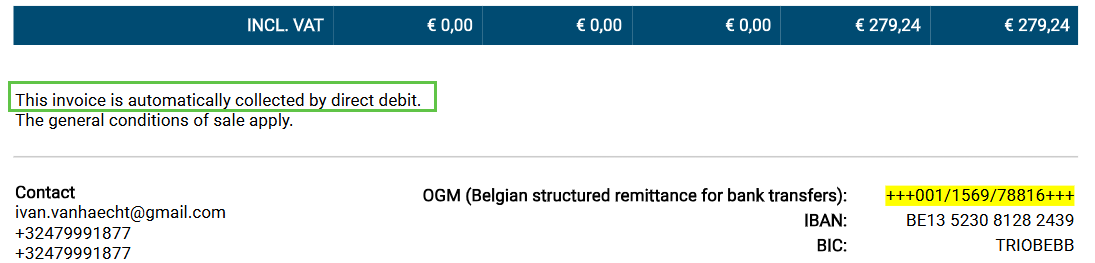
DomiciliationMandateSigningDate : this information is not put in the UBL.
When you use your own PDF:
- Billit adds automatically info to the payment id : cbc:PaymentIDThis invoice is automatically collected by direct debit</cbc:PaymentID>.
- You can always add additional info if desired. This could be in the customer field PaymentTerms (more info PaymentTerms.
How to view result in MyBillit user interface
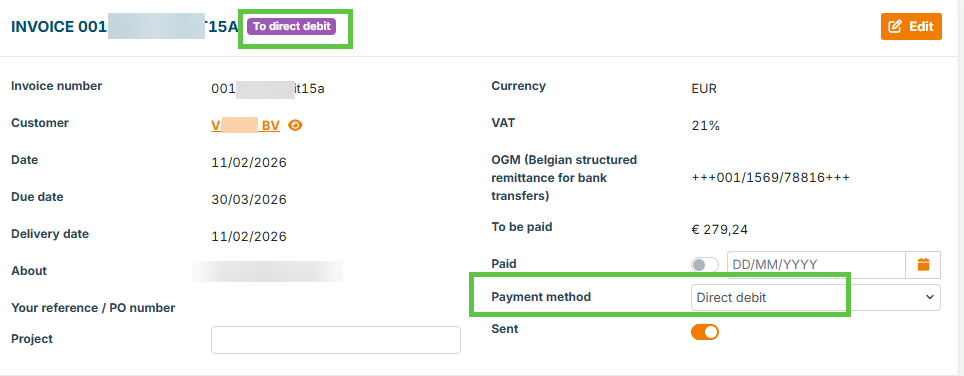
When using the MyBillit user interface, Direct debit is clearly marked:

Detail Screen:
Updated 8 months ago