
Communications Overview PA
PA Communication from the point of view of the Seller/Supplier for Domestic B2B flow
Communications between Seller and Billit
As a Seller/Supplier working with Billit, you only need to activate a limited number of communications.
Schematic overview of 3 types of Communication:
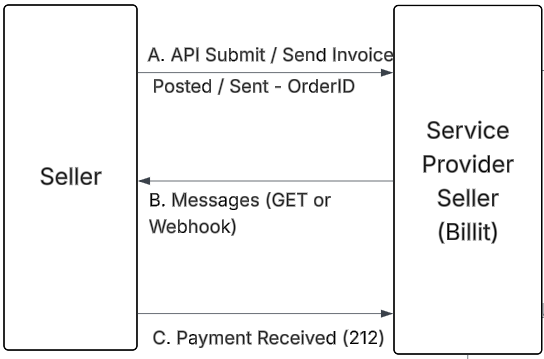
Explanation:
- A. API Submit / Send Invoice
- Submit API content to Billit (status code 200 and OrderID are returned)
- Launch the sending of the Invoice : via API or automatic sending next day
- B. Capture feedback messages
- Perform GET of the messages on a regular base
- Activate webhooks
- C. Send status back : payment received
- When payment is received, this status is returned to the network via API
Global Process Overview B2B Domestic
When sending B2B domestic invoices from a French supplier to a French B2B customer, the the following 3 flows are involved:
| Flow/Flux | What |
|---|---|
| Flux 2 | Submit Invoice and Credit Note |
| Flux 1 | E-reporting to Government |
| Flux 6 | Status Exchange |
As a Seller/Supplier, the communications with Billit are limited to the 3 communications above.
Below a diagram of the Global Flow allowing a more global understanding (sales invoice).
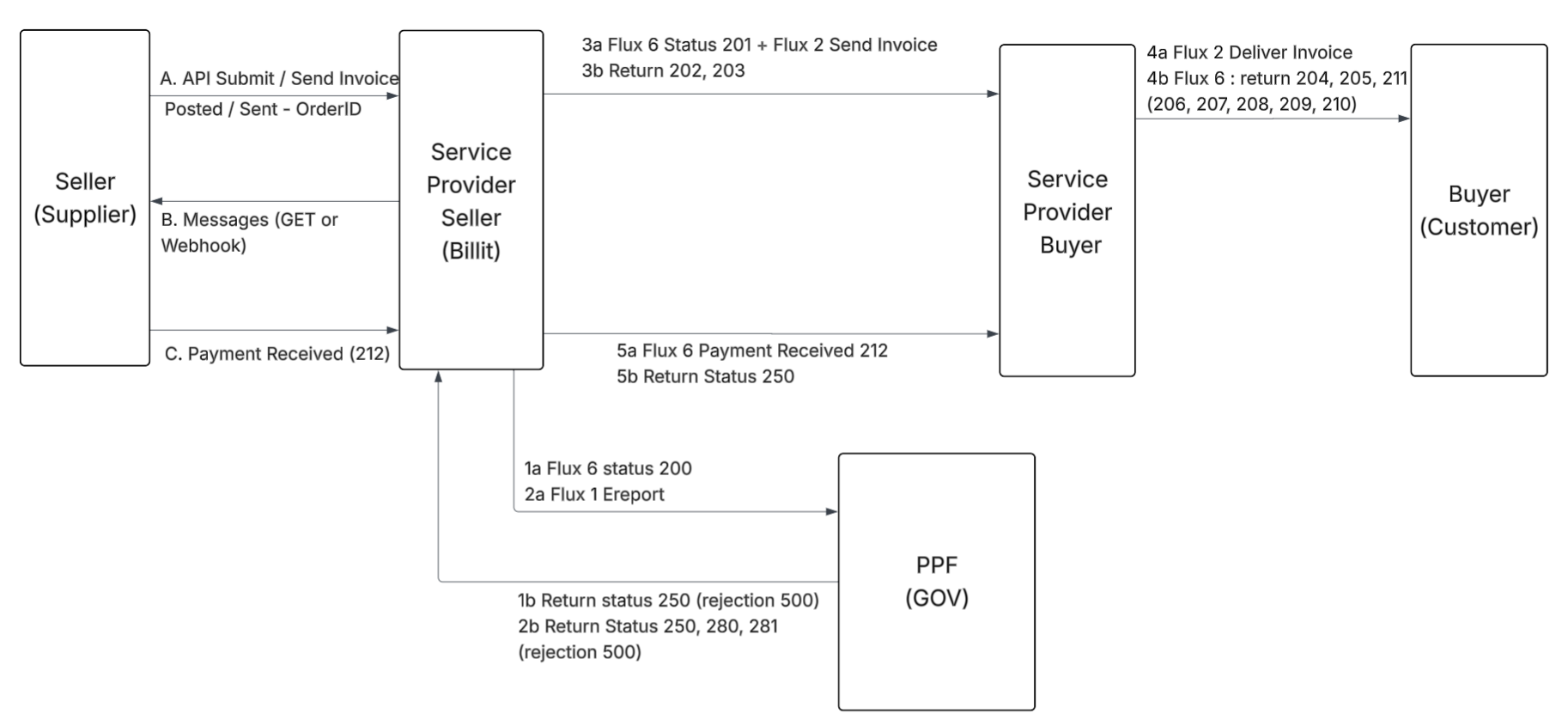
More information:
- PPF
- 1 : start with status exchange between Billit and PPF (Flux 6):
- send status 200 (automatically done by Billit)
- get status 500, 250 (stored by Billit in messages)
- 2 : Ereporting Flux 1 (automatically done by Billit)
- Billit ereport to PPF
- Get return statusses 500, 250, 280, 281 (stored via Billit - messages segment)
- 3 : Sending
- 3a Sending (by Billit)
- Sending of the notification 201 to the service provider of the buyer (flux 6)
- Sending of the invoice Flux 2
- 3b Return statusses
- Get return statusses 202, 203 (stored via Billit - messages segment)
- 3a Sending (by Billit)
- 4 : Communication between Service Provider Buyer and Customer
- 4a Service Providers delivers invoice to Customer (Flux 2)
- 4b Service Provider Customer gets status from Customer (Flux6),
- can be one or multiple status messages as there are several optional statusses
- 5 : Payment
- 5a Payment received by Seller notifications (Flux 6)
- Notification sent to the Service Provider Buyer
- +Notification sent to the PPF (status code 250)
- 5a Payment received by Seller notifications (Flux 6)
- 1 : start with status exchange between Billit and PPF (Flux 6):
Updated about 1 month ago